




19 Aug 2015

Cùng thực hiện phương pháp nhịn ăn - thanh lọc cơ thể đẩy độc tố trong cơ thể ra ngoài


Cùng thực hiện phương pháp nhịn ăn - thanh lọc cơ thể đẩy độc tố trong cơ thể ra ngoài

 LỢI ÍCH CỦA NHỊN ĂN:

Với cuộc sống hiện đại ngày nay, cơ thể chúng ta vì bị chứa đầy các chất dơ bẩn đến nỗi không thể chịu đựng đuợc một đợt nhịn ăn dài ngày. Vậy chúng ta nên có các đợt nhịn ăn ngắn ngày và đều đặn để thanh lọc cơ thể mà ít bị căng thẳng nhất.

Nhịn ăn tạo ra cho toàn cơ thể bạn như tim, dạ dày, ruột, thận, phổi, tuỵ gan, v.vv..một cơ hội để nghỉ ngơi và lấy lại sức mạnh để nó có thể hoạt động tốt với một hiệu quả lớn hơn nhiều sau khi nhịn ăn. Đặc biệt là tim và các mạnh máu, không còn còn phải bơm nhiều máu như vậy tới hệ thốn tiêu hoá nữa để tiêu hoá thức ăn, có một kỳ “nghỉ” rất cần thiết.

Nh ịn ăn tạo ra sự phá vỡ và bài tiết cá chất thải độc hại bám vào toàn bộ các cơ quan và các mô của cơ thể và do đó làm sạch toàn bộ cơ thể, tạo điều kiện cho dạ dày làm việc với hiệu quả cao nhất

Nhịn ăn làm trẻ lại toàn bộ hệ thống và làm chậm quá trình lão hoá của các tế bào, nhu mô, và mạch máu, chính vì vậy nhịn ăn làm cho con người trẻ ra và sống lâu .

Nhịn ăn hỗ trợ cho sự tiết xuất của các nội tíêt tố trở nên cân bằng và sự phối hợp điều hoà của các tuyến nội tiết với các cơ quan của cơ thể.

Nhịn ăn là quá trình để bảo toàn nuồn năng lượng, phục vụ cho cho sự thăng hoa về tinh thần , tâm trí và tâm linh hay Thiền định

Nhịn ăn luôn làm cho tâm, trí, bộ não luon tỉnh táo,minh mẫn đồng thời làm cho các aơ quan giác quan trở nên nhanh nhẹn và nhạy bén và tăng khả năng tư duy, lozic, tăng trí nhớ .

Nhịn ăn làm cho da bạn ngày càng trở nên mịn màng và sáng hồng hơn, vì những lỗ chân lông trên da mặt của bạn đã được tự tẩy sạch những độc tố do chúng ta ăn quá nhiều chất béo và đò ngọt. Mjn nhọt và trứng cá, nhiễm trùng da ... đều có thể được thuyên giảm. Đặc biệt là “đôi mắt – cửa sổ tâm hồn “ bạn ngày càng trở nên long lanh, trong sáng toát lên từ tâm sâu thẳm.

Nhịn ăn giúp Nam giới dẹp bỏ sự thôi thúc phải hút thuốc và uống rượu. Ăn nhiều làm cho thần kinh Bạn luôn bị căng thẳng, khi đó người ta tìm sự thư giãn qua thuốc lá và rượu. Nhịn ăn làm thư giãn thần kinh và do đó loại bỏ được khao khát này.

HƯỚNG DẪN NHỊN ĂN:

Nhịn ăn theo yoga là nhịn ăn chỉ 1 ngày duy nhất, tức là từ lúc mặt trời mọc ngày hôm nay đến lúc kết thúc ở mặt trời mọc của ngày hôm sau (khoảng 6 giờ sáng). Trong ngày nhịn ăn chúng ta nên vận động và đi lại ở ngoài trời thở sâu để kích thích sự tuần hoàn máu và thúc đẩy quá trình đào thải chất cặn bã .

Nhịn ăn thì phải được thực hiện từ từ, không đuợc đột ngột, vội vã.
Lần đầu tiên nhịn ăn, thì bạn có thể ăn trái cây và uống sữa.
Lần tiếp theo thì chỉ ăn trái cây và nuớc sinh tố ( nuớc ép trái cây) (Không uống sữa)
Lần kế thì Các bạn chỉ uống nuớc.
Lần sau cùng thì các bạn không ăn không uống gì cả (Nhịn khô). Theo cách này các bạn sẽ thích nghi dần và dễ dàng hơn với nhịn ăn.

Cách nhịn ăn tốt nhất là không ăn không uống gì cả (Nhịn khô). Bằng cách nhịn này, nhịn ăn có tác dụng nhanh nhất và hiệu quả nhất, ép kiệt được tất cả mọi độc tố trong cơ thể ra ngoài. Ngoài ra còn một lý do quan trọng nữa để không uống nuớc, liên quan tới tác dụng của mặt trăng lên cơ thể con người (mà tôi đã post với topic “Nhịn ăn theo tuần trăng Ekadashi”).

Chú ý: Những ai bị sỏi thận, sỏi mật, huyết áp thấp thì không được nhịn khô (phải uống nước). Trẻ em (duới 12 tuổi), phụ nữ mang thai và các bà mẹ đang thời kỳ cho con bú không nên nhịn ăn.

Còn những nguời ốm yếu hay quá đau yếu không thực hiện đuợc nhịn ăn hoàn toàn nên “nhịn ăn một nửa”, tức là nhịn từ sau bữa trưa cho đến tận sáng hôm sau .

XẢ NHỊN:

Ngưng nhịn ăn như thế nào cũng quan trọng gần như bản thân vấn đề nhịn ăn vậy. Sau khi Bạn đã làm sạch toàn bộ cơ thể bạn nghỉ ngơi, nếu bạn lại nhồi nhét đầy cơ thể bạn với những số lượng lớn thức ăn khó tiêu, làm dạ dày bạn bị quá tải và căng ra, bạn sẽ vô hiệu hoá tất cả những tác dụng tốt nhất của sự nhịn ăn. Vì vậy bạn phải thực hiện việc ngưng nhịn hay xả nhịn

Sáng hôm sau ( từ lúc mặt trời mọc), khi còn ở trên giường, bạn hãy thực hiện động tác búng chân, tức là co hai chân ép sát ngực, hai tay ôm chân, rồi búng mạnh ra, 3 hoặc 4 lần liên tiếp.

Sau đó bạn hãy uống tối thiểu là 1 lít nước chanh muối (khoảng 1 quả chanh tuơi trong 1 lít nước muối, với tỷ lệ trung hoà). Dung dịch muối mới đó là một trong những chất làm sạch cơ thể hiệu quả nhất, đồng thời dung dịch đó cũng mang tính chất kiềm thì khi vào trong cơ thể nó sẽ làm trung hoà các loại axít và làm loãng niêm dịch và tất cả chất nhầy này sẽ được tẩy sạch ra khỏi các mô trong khi nhịn ăn và hoà tan chúng để có thể bài tiết dễ dàng.

Tiếp theo là chúng ta sẽ ăn từ từ 1 hoặc 2 quả chuối (chú ý những nguời bị các chứng bệnh liên quan tới cột sóng và cơ lưng như đau lưng, cột sống ... thì không nên ăn chuối tiêu). Khi ăn chú ý ta có thể cắn nhỏ từng miếng không nhai mà phải nuốt chửng. Bởi Chuói có tác dụng hấp thụ và trung hoà các chất độc còn lại ra khỏi hệ thống tiêu hoá như dạ dày và ruột và nó có tác dụng bôi trơn ruột.

Lần đầu nhịn ăn thì các bạn nên áp dụng tỷ lệ 1 : 1 : 1 : 1 (nghĩa là 1 lít nước ấm + 1 trái chanh + 1 muỗng cafe muối + 1 quả chuối cắn nhỏ và nuốt). Nếu không xả nhịn được thì lần sau tăng lượng chanh muối lên (2 quả chanh + 2 muỗng café muối). Miễn sao độ mặn = độ chua, nếm thấy vừa phải là được vì còn tùy chanh ít hay nhìu nước. Các bạn pha ra 1 cái tô rồi uống, uống ít hơi thôi (tùy khả năng nhé, không cần phải cố sức gì cả).

Sau đó cơ thể bạn sẽ có nhu cầu đi wc liên tục để xả các chất cặn bã ra ngoài. Lúc này bạn xem như đã xả nhịn thành công.

Sau đó khoảng 30 phút (nếu có thể) Bạn có thể ăn sáng.

Bữa ăn đầu tiên sau khi nhịn phải nhẹ, có nhiều trái cây hoặc rau tuơi (đặc biệt là các loại lá xanh và mầm). Nếu có điều kiện thì các bạn có thể ăn sữa chua hoặc trộn hoa quả trên với sữa chua. Bởi bữa sau khi nhịn này , nếu bạn ăn rau có chất xơ, và trái cây cuang cấp nứoc sẽ giúp bạn quét sạch đừong tiêu hoá hơn. Còn sữa chua như 1 nguồn men tiêu hoá gúip dạ dày bạn khởi động dần sau 1 quá trình nghỉ ngơi.

Nói chung là bữa sáng + trưa thì ăn nhẹ (tốt nhất là ăn lỏng), tối ăn lại bình thường.

Sau ngày nhịn ăn bạn nên tắm kỹ bỡi một phần độc tố được thải qua các lỗ chân lông.

Trích Nguồn Từ: pinkymouse

11 Feb 2015

Top 10 Websites to Learn Coding

1. MIT OpenCourseWare


MIT has opened all of its course content to web audiences, so anyone, anywhere can learn from one of the top American research institutions. MIT course ware has a number of courses related engineering and computer science. It provides all the free resources as exams, assignments, design and analysis algorithms and more.

2. Udacity


It provides a big number of online computer science, math, physics Salesforce, mobile development, web development, AI courses, etc and you can also create projects and received a verified completion certificate recognized by the industry.

3.Mozilla Developer Network


The mozilla provides a developer network for programmers where they can learn new technologies and get a great collection of resources to get you started. This network helps you learn HTML, CSS, Javascript, graphics includes tutorials, reference guide, demos and developer’s guide. MDN is a wiki, meaning anyone can edit its pages with corrections and updates.

4.The CodePlayer


On The CodePlayer, watch interactive presentations that explain how people built things from scratch. Once you become a coding pro, you can add your own presentations to teach others what you know.

5. Codeacademy


Join the community of codecademy and You can choose from courses grouped into eight tracks: APIs, Ruby, Python, JavaScript, jQuery, PHP, web fundamentals, or combine languages into projects.

6. Khan Academy


Khan Academy brings millions of students from around the world together to learn all sorts of digital skills, from coding to calculus to computer science theory. This means you can become an expert coder and an expert mathematician in the same place.

7. Learn Python the Hard Way


python- I am Programmer

Learn Python the Hard Way offers free PDFs, though, if you want to take the video version of the course, you’ll need to fork up $29. What does learning the “Hard Way” mean? The number-one rule is that you can’t copy-paste; you must type out each of the lessons in order to teach your hands the language.

8. Talent Buddy


Talent Buddy provides a place for programmers where they can find the exercise of languages C, C#, C++, Javascript, PHP, Python, Ruby and enjoyable interview oriented way.

9. Code Avengers


Code avengers have courses with code challenges of HTML, CSS, JavaScript to learn how to program games, apps and websites. This is a place where beginners can learn a lot and make awesome projects.

10. Coursera


Online education giant Coursera brings courses from dozens of top universities online, and lets anyone take them for free. Coursera classes are now available in five languages, English, Spanish, French, Italian and Chinese, and are taught by professors from 62 universities.

15 Jan 2015

Create a Smooth Scrolling "Back To Top" Button for Blogger


Finally yet another exciting trick to create a smooth scroll to top button for BlogSpot blogs. We designed and released many buttons and tutorials on back to top/bottom buttons but they were all static and had no fade out effects and smooth scroll effects. Luckily we just discovered a cool jquery script that does all the work. A back to top button is crucial for a blog or site because visitors enjoy easy site navigation so this button will provide them with this ease. We have kept the installation process a one step process. Please see this button in action towards the bottom right corner of this blog.


The best thing about this button is that it appears only when the user scrolls down the page and disappears as he scrolls up.

Add Scroll to Top button to Blogspot

  1. Go To Blogger > Design
  2. Choose HTML/JavaScript widget
  3. Paste the following code inside it
Replace IMAGE LINK with the image link of your back to top button. You can get several beautiful free buttons from our library. Download Back to top/bottom buttons.

4.   Save the widget and drag it near the footer or any bottom position.
      5.  View your blog to see the magic.

I this little trick works for all of you. If you have any questions on how to adjust the position and fade duration then please let me know. I didn't mention them for simplicity. Please do a favour by sharing it with your friends on FB and G+. Peace brothers. :)

Guide to Embed Almost Anything in your Website

arn how to embed almost anything in your HTML web pages from Flash videos to Spreadsheets to high resolution photographs to static images from Google Maps and more.
Embed RSS Feeds in Web Pages
Go to this page, replace the feed URL with your own feed, use the default color scheme or change it to something else and then click Get Code. You’ll get a JavaScript snippet that can be easily placed in the sidebar of your blog.
If you like to embed feeds from multiple sources, merge all of them into one using Yahoo Pipes and then pass the combined feed to the Google Gadget. You can also use RSS widgets like WidgetBox or YourMinis that are done in Flash and not JavaScript.
Embed High Quality or HD YouTube Videos
To embed a high resolution version of YouTube clip in your web pages, first make sure that “Watch in High Quality” or “Watch in HD” link exists next to the YouTube player as most videos are only available in standard format.
Next copy the YouTube embed code and append &ap=%2526fmt%3D18 (for high quality) or &ap=%2526fmt%3D22 (for 720p High Definition) to the URL value of the movie parameter in both instances (see YouTube HD example).
Embed MP3 music and other Audio
If you like to embed audio files like songs, podcasts or interviews in your web pages, use Yahoo! Media Player – its a free Flash music player that automatically detects all links to MP3 files in the current web page and turns them into a music player.  Another alternative is the Google MP3 Player.
To embed other audio formats like 3GP, Midi, Real or Windows Media, it may be a good idea to convert these files into MP3 using Zamzar so that they play on almost any web browser.
Embed Flickr Photos and Slideshows
To embed an individual Flickr photograph in your blog, click the "Share This" link (available next to the photo title) and choose embed it. Flickr requires that the embedded image should link back to Flickr and this built-in embed option automatically takes care of that requirement. (see example)
To embed a Flickr photo slideshow in your web page, open any Slideshow in a new page (see example) and choose "Customize HTML" from the embed option (seeexample). Here you can specify a custom size for your Flash slideshow so that it fits just right into your web page.
Embed Picasa Web Albums
When you open a photo album inside Picasa, click the link in the right sidebar that says "Link to this album" and choose "Embed Slideshow". You can use the same approach to embed individual photographs that are available inside Picasa.
Embed Events from Google Calendar
Click the drop-down arrow next to any Google Calendar and select Calendar settings. Open the Google Embeddable Calendar Helper program by clicking the customize button and choose elements that you want to display or hide in the calendar.
Embed Very Large Photographs
To embed really large images in your blog, you may either use Deep Zoom or theGoogle Maps viewer. These programs break your photographs in small tiles and you can even pan / zoom across these images very similar to the default interface of Google Maps.
Embed Charts and Graphs in Web Pages
My personal favorite is Zoho Sheet – any chart created inside Zoho Sheet can be published as an external image without exposing the full spreadsheet. If you are interested in creating charts with low volume of data, use Google Charts. 
Embed GIF Animations and Screencasts
GIF animations (see example) are a perfect way to embed short screencasts in web pages as they require no plugins and auto-play inside feed readers. You should upload GIF files to your Flickr account as it preserve all the frames while lot of other image hosting website will drop anything after the first frame.
Embed Chat in your Blog
If you like to chat with visitors who are currently on your site, get the chat widget from Meebo Me and place it in the sidebar of your website. Visitors show up in your Meebo buddy list so you can strike up a conversation, answer questions, or just keep tabs on guests. Also see some more options to embed chat in blogs.
Embed Word Documents
Upload your document to Scribd and they’ll give you the embed code in Flash. Scribd supports both doc and the new Office 2007 docx format in addition to Open Office documents. Even Barack Obama is using Scribd to upload his public documents and upcoming plan.
Embed PowerPoint Presentations
While the popular choice is Slideshare, you should also consider using Issuu (best web application) for presentations that are either large or formatted in the form of magazines or catalogues (see example). The only downside is that Issuu accepts PDFs so you need to convert the presentation before uploading onto Issuu.
Embed Spreadsheet Data
Both Zoho Sheet and Google Docs allow you to publish a range of cells from a spreadsheet into a web page but the embedding process in Zoho is less complicated – select a range and choose "Publish" from the contextual menu to embed that range into your web page.
Embed Adobe PDF Files
To embed PDFs in a web page, you can either use Issuu (for magazine style PDFs) or Scribd for PDFs has either have lot of text or have a top-to-bottom reading layout similar to Word documents.
Embed Flash (SWF) or Flash Video (FLV)
The best option to embed Flash content is via swfobject. It improves the overall user experience by providing alternatives in case Flash is missing and your Flash content also becomes more searchable. This tutorial has all the files and other details to help you get started with SwfObject 2.
Embed LinkedIn Profile
If you wish to display your LinkedIn profile in the sidebar of your blog, tryLinkInABox. People (site visitors) can read a summary of your LinkedIn profile without leaving the site.
Embed Google Maps in Web Pages
Embedding a Google Map in your website is now almost as easy as adding an image – just open the Static Maps wizard, search for location that you want to embed and specify the dimensions of your map. They’ll provide a simple URL that actually points to a static image of that map.  
Embed Another Webpage in your Blog
If you like to embed another website into your web page, your best bet is anIFRAME tag also known as an Inline Frame. Just set the SRC value to the address of the web page that you want to embed into your current HTML document. You could try IFRAMEs for inserting live search results from Google into your web page without having to worry about APIs.
Embed Windows Media or QuickTime movies
While it is possible to embed mov or wmv videos in web pages directly using theOBJECT tag, I recommend that you put these videos onto blip.tv and then embed them in web pages as Flash video.  That’s because your visitors can then play the video without extra plugins and two, they always have the option to download the video in the original format from blip.tv servers.
Embed Other Fonts in Web Pages
Most web pages use universal fonts like Arial, Times New Roman or Verdana since they are installed on most computers and hence your web pages will render correctly. If you want to try something different and render pages in fonts like Microsoft Calibri or Adobe Garamond Pro that are only available on some machines, all you need is sIFR – it lets you use almost any font for your web pages using JavaScript + Flash and is perfect for writing “newspaper style” headlines.
Embed your Lifestream in a Web Page
You have a presence on YouTube, Flickr, Twitter, Last.fm, Facebook, Amazon and a dozen other online places. It can get really tough for friends to track you at so many places so what you should do is create an account at FriendFeed, import all the different services that you use and then use the FriendFeed Badge to embed your lifestream activity on your main site. You can also create Lifestream with Google Reader.

BOOST YOUR SEO TOOLS

No matter the size or purpose of your website, Search Engine Optimization (SEO) is vital if you want to be found online.
You likely know this already. While it’s easy to understand the importance of SEO, it can be a bit challenging to determine exactly what tools you should use to help you improve your site’s search engine rankings. So, it’s time for another one of my helpful lists: 6 tools to help you boost your SEO.
The following list includes free and paid tools that will help you to improve your site’s searchability, visibility, and thus findability. The tools featured in this list will help you with some of the core SEO tasks that you as a digital marketer need to utilize in order to be found online. There are many, many more tools available online. This list is merely a compilation of tools we at 9 Clouds have found helpful for our digital marketing efforts.

1. GOOGLE KEYWORD PLANNERkeyword research

The Google Keyword Planner is a great tool for finding the best keywords for your site. The powerful tool allows you to brainstorm keywords, refine search results, view keyword data by geography, unearth historical keyword data to determine seasonality trends, create a full keyword plan, and determine keywords to go after based on competitor’s websites.
Even though this tool is free, you’ll need a Google AdWords account in order to access this tool. If you don’t already have an account, it’s easy to set one up and you don’t have to commit to make a payment.

2. GOOGLE WEBMASTER TOOLS

Another great Google tool for monitoring and optimizing your site’s SEO is Webmaster Tools. Once you sign up and your site has been verified, you can see when and how often it shows up for keywords, your top 25 keywords, impression data, what pages have been indexed to your site, links that are pointing to your site, average search positions and more. As the Google Webmasters say themselves, “You want to be found on the web. We want to help.” Put simply, this tool helps you to see your website as Google sees it and make adjustments accordingly.
One caveat of Google Webmaster Tools is that it only shows you the impressions you get from keywords that you already rank for, not for potential keywords. Thus, Webmaster Tools offers the most value when it is used in conjunction with the Keyword planner or another keyword research tool to find new keyword possibilities.

3. SEO QUAKE

The SEO Quake toolbar is a great tool to add to your SEO optimization arsenal. The toolbar allows you to access a wide variety of helpful SEO tools while browsing the Internet. You can customize search results, access keyword density reports, monitor competitor site’s SEO, get link counts and much more — all while browsing the web!
You can download the toolbar for free and try it out.
Looking for more SEO toolbar options? A few months ago, I compiled a list of other plugins that offer a host of SEO optimization features for a variety of browsers.

4. MOZ

Moz offers a suite of tools that are all designed to help you continually analyze and refine your website and optimize your SEO all at the same time. Some of the specific features of the Moz tools suite include: analyzing site regularity, managing your SEO, website crawling and rank tracking, social media monitoring and management, analytical reporting, and research capabilities.
Learn more about the suite of Moz tools and their pricing models.
Aside from their premium suite offerings, Moz has a few free standalone services that help with specific aspects of SEO. One of these tools, Get Listed, is a great tool to optimize your online business listings. Simply type in your business name and the zip code, and Get Listed will show you which business listings you already have claimed,  and which business listing services that you have yet to claim. It also provides the links to claim your listing on each service, all from one handy page.
Another great tool for targeted link building is Open Site Explorer. The tool allows you to enter a website and in return it provides you with details about other sites that link to it. This easy-to-use tool is a great way to monitor your competitor’s site links.

5. UBERSUGGEST

A bit more simple than the Google Keyword Planner, Ubersuggest is a free program that allows users to quickly and easily generate keyword ideas. Powered by Google Suggest, Ubersuggest works by scraping search results, adding a letter or digit to your search term and generating a list of suggested keywords keywords
based on those results.
This tool was developed with ease of use in mind, making it a great way to quickly brainstorm and find keywords that users in your niche target are searching for. When you type in your keywords and hit “enter”, you’re presented with nearly 400 recommended phrases.

6. LIVE KEYWORD ANALYSIS

While finding the right keywords is pivotal to the SEO effectiveness of your website, finding the right balance of those keywords is almost just as important. Creating the best keyword density on your own can be challenging, even if you know what percentage you want to shoot for. Enter the Live Keyword Analysis tool. This tool is very easy to use and it is a great way to check and optimize your keyword density.
To use the tool, just enter the keywords you want to target and paste in your text. The tool will then immediately analyze the text and produce your keyword density. The site also provides tips and tricks to help you ensure you’re getting the most SEO value from the tool as possible.

FINAL TIP: JUST KEEP OPTIMIZING

Search engine optimization takes a lot of work. And it usually takes quite a long time for that hard work to actually pay off in terms of better search results and higher rankings — you have to be patient. Don’t jump to conclusions and immediately assume your hard work was for nothing. Many times, it takes weeks, and possibly even months, to see results.
One final tip: Never utilize any Black Hat SEO tactics, like keyword stuffing, invisible text or doorway pages or any other unethical tactics to try to improve your search engine rankings…the search engines will notice. And when they do, your site goes onto their list. This is not a good list! Once you’re on, it’s nearly impossible to get off. Not only does your site’s reputation suffer, but with it, so does your SEO.
So just keep up the hard work, remember that it’s all worth it, and avoid black hat techniques like the plague.

Source from: https://9clouds.com/author/abby/

13 Jan 2015

Create sitemap XML for Blogger blog in 1 minute.


Create sitemap XML for Blogger blog in 1 minute.


A Sitemap is a list of accessible pages in your website. Sitemaps helps search engines like Google, Yahoo and Bing to easily crawl pages in your site which helps in better index. As a blogger you must create a sitemap so whenever you make a new post search engines can crawl and index them easily. In this post will guide you to create sitemap for Blogger blog and submitting it to Google webmaster tools in just 1 minute.

Default Blogger sitemap

By default your blogger blog will have sitemap, but the issue with that sitemap is it only shows your recent blog posts. A perfect sitemap is that it should contain the list of all you pages so that search engines know the complete structure of your site. Let’s see how to create sitemap for Blogger blog.

How to create sitemap for Blogger

Creating sitemap is very simple. Just use this (atom.xml?redirect=false&start-index=1&max-results=500)next to your blogs URL. See example below.
http://yourblogname.blogspot.com/atom.xml?redirect=false&start-index=1&max-results=500
Now you have created sitemap for your Blogger blog, but you need to tell search engines about your sitemap by Submitting your sitemaps in Google webmaster tools

Submitting your Blogger sitemap in Google webmaster tools

Login to your Google webmaster tools and select you website. In your site dashboard click sitemaps below. Now click add/test sitemaps, add your sitemap (just the atom.xml?redirect=false&start-index=1&max-results=500) and submit your sitemap.

That’s it you have successfully submitted your sitemap in Google webmaster tools. Now it’s ready for crawling and indexing. You can find the number of pages crawled and indexed in Google webmaster tools.
Blogger sitemap - Submitting sitemap in Google webmaster tools
If you like then also submit your Bloggers sitemap to Bing webmaster tools.

How to Boost Your SEO by Using Schema Markup


One of the latest evolutions in SEO is called schema markup. This new form of optimization is one of the most powerful, but least-utilized forms of SEO available today. Once you grasp the concept and method of schema markup, you can boost your website in the search engine result pages (SERPs).


My goal in this article is to show you exactly how to get started using schema markup for your website.

First, let’s understand what schema markup is.

Schema markup is code (semantic vocabulary) that you put on your website to help the search engines return more informative results for users. If you’ve ever used rich snippets, you’ll understand exactly what schema markup is all about.
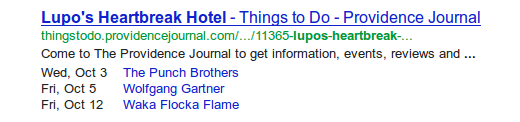
Here’s an example of a local business that has markup on its event schedule page. The SERP entry looks like this:
google search result
The schema markup told the SERP to display a schedule of upcoming hotel events. That, for the user, is exceptionally helpful.
Here are some facts about schema markup:

Schema tells the search engines what your data means, not just what it says.

The content on your website gets indexed and returned in search results. Obviously. But with schema markup, some of that content gets indexed and returned in a different way.
How? Because the markup tells the search engine what that content means. For example, let’s say the word “Neil Patel” appears on an article. The search engine sees this, and produces a SERP entry with “Neil Patel.” However, if I put the right schema markup around the name “Neil Patel,” I’ve just told that search engine that “Neil Patel” is the author of the article, not just a couple random words. The search engine then provides results that display better information for the user who was searching for “Neil Patel.”
Schema.org explains it this way:
Most webmasters are familiar with HTML tags on their pages. Usually, HTML tags tell the browser how to display the information included in the tag. For example,

Avatar

tells the browser to display the text string “Avatar” in a heading 1 format. However, the HTML tag doesn’t give any information about what that text string means — “Avatar” could refer to the hugely successful 3D movie, or it could refer to a type of profile picture—and this can make it more difficult for search engines to intelligently display relevant content to a user.

Schema markup uses a unique semantic vocabulary in microdata format.

You don’t need to learn any new coding skills. Web pages with markup still use HTML. The only difference is adding bits of schema.org vocabulary to HTML Microdata.

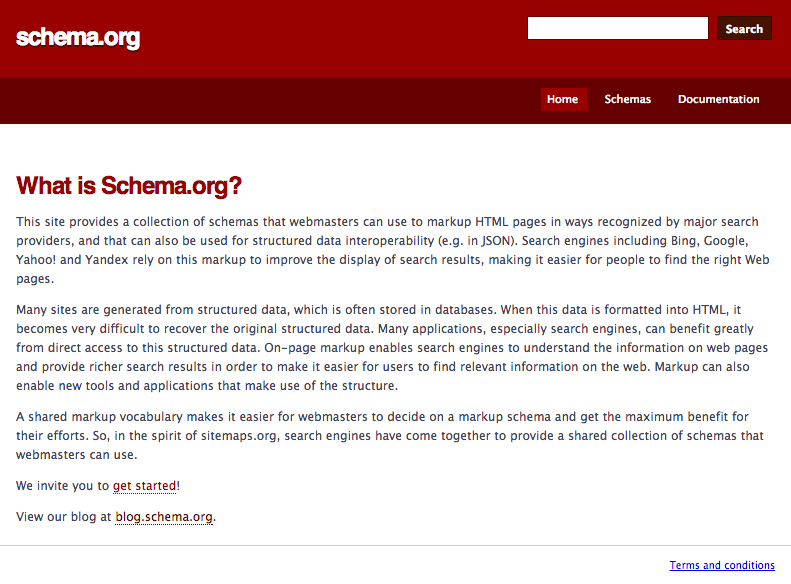
Schema.org, the website for schema markup, was created by a collaborative team from Google, Bing, and Yahoo.

what is schema.org
It’s not too often that competitors come together to help each other, but Schema.org is exactly that kind of inter-industry collaboration. What you have, then, is an agreed-upon set of code markers that tells the major search engines what to do with the data on your website.

Schema markup was invented for users.

When a website has schema markup in place, users can see in the SERPs what a website is all about, where they are, what they do, how much stuff costs, plus plenty of other stuff. Some people have taken to calling schema markup “your virtual business card.”
This is a user-focused improvement. Search engines exist for users to gain the information they need. Schema markup does exactly that.

Second, let’s understand why it’s so important.

Schema markup helps your website rank better for all kinds of content types. There is data markup for…
  • Articles
  • Local businesses
  • Restaurants
  • TV episodes and ratings
  • Book Reviews
  • Movies
  • Software Applications
  • Events
  • Products
There are hundreds of markup types — from toy stores to medical dose schedules. If you have any type of data on your website, there’s a good chance that it’s going to have an associated itemscope and itemtype.
Websites that use schema markup will rank better in the SERPs than companies without markup. One study determined that websites with markup rank an average of four positions higher in the SERPs than those without schema markup. While it’snot totally clear that this higher result is due to the markup alone, there is obviously some correlation.
Right now, one third of Google’s search results incorporate rich snippets, which includes schema markup. However, according to Searchmetrics, only 0.3 of all websites use schema markup.
In other words, there are millions of websites missing out on a huge source of SEO potential. If you use schema markup, you’ll automatically have a leg up on the vast majority of your competition.

Third, let’s understand how to use schema markup on your website.

Now, let’s talk about how to use schema markup. Your goal is to rank better, look better, and do better in the SERPs and in front of users.
Schema markup will help you. With your website in hand, follow these steps.

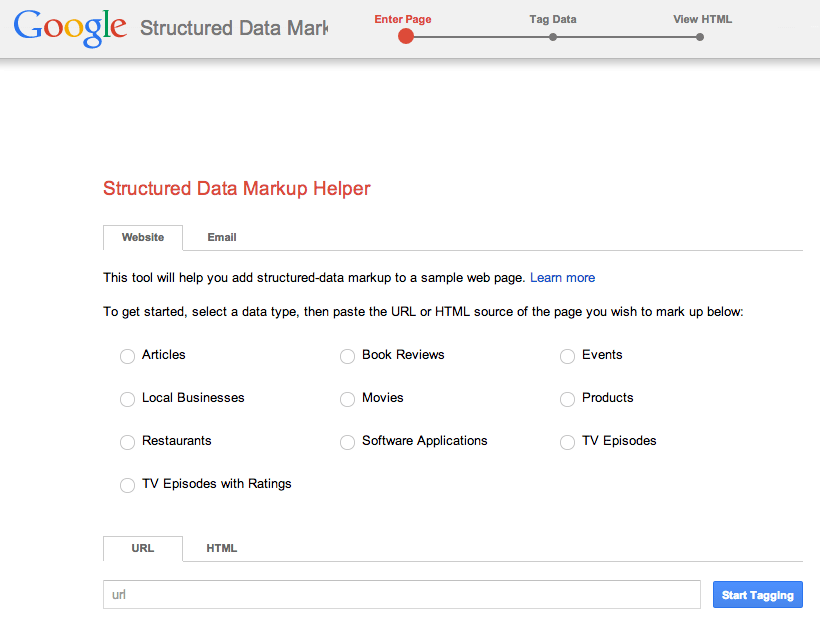
1. Go to Google’s Structured Data Markup Helper.

google structured data markup helper

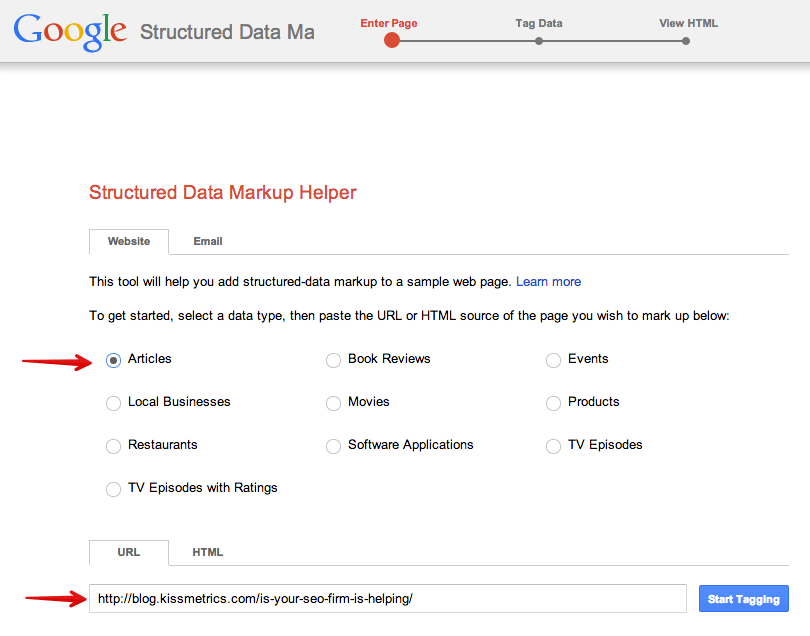
2. Select the type of data that you plan to markup.

There are several options listed. This list is not exhaustive. For the sample below, I’m going to use “Articles” since it’s one of the most common types of content.

3. Paste in the URL of the page or article that you want to markup.

If you only have HTML, you can paste that instead. Then, click “Start Tagging.”
structured data markup helper
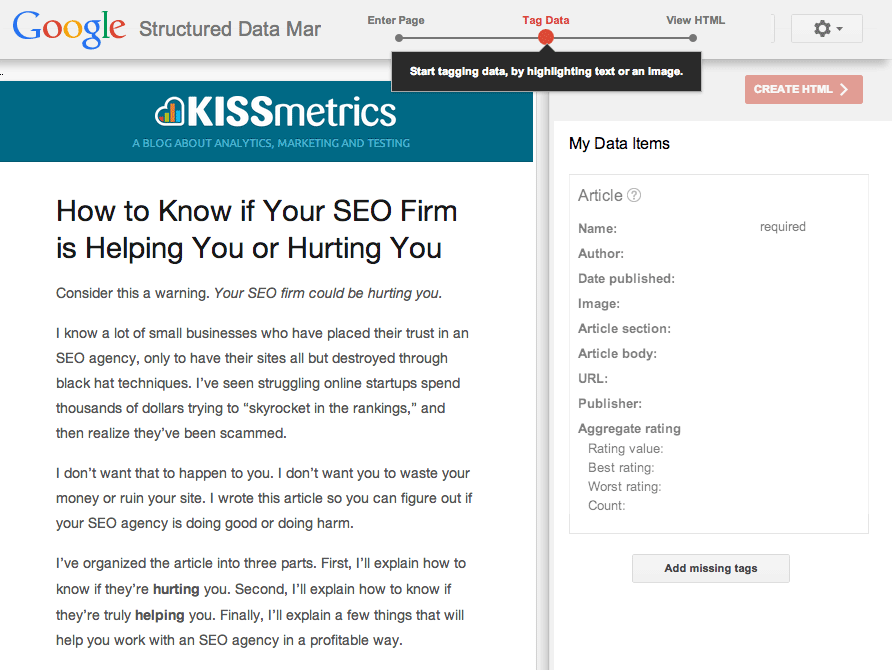
The page will load in the markup tool, and provide you with the workspace for the next phase of markup — tagging items. You’ll see your web page in the left pane, and the data items in the right pane.
structured data markup

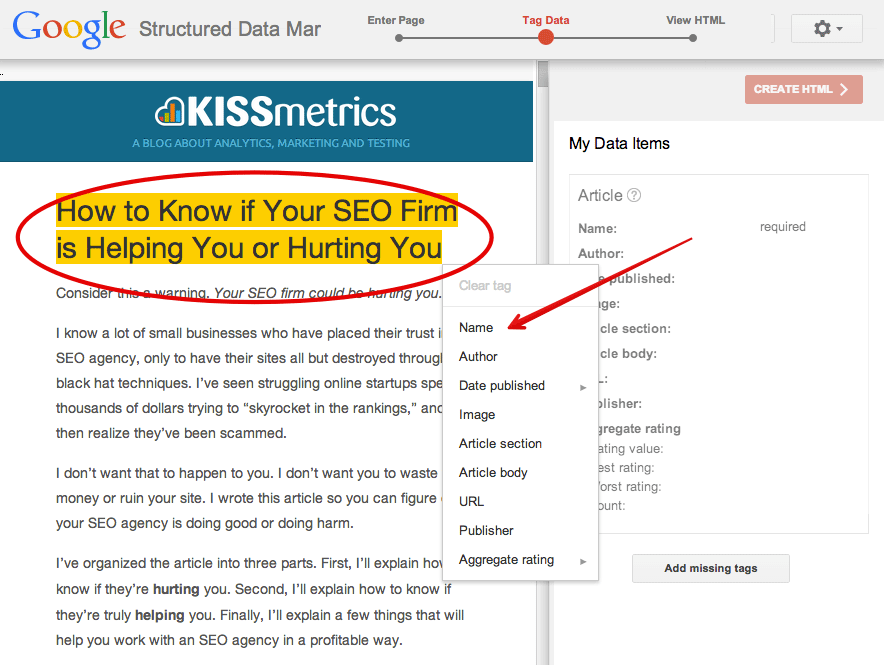
4. Highlight and select the type of elements to be marked up.

Since this piece of content from KISSmetrics is an article, I’m going to highlight the name of the article in order to add “Name” markup. When I finish highlighting, I select “Name” from the tool tip.
structured data markup
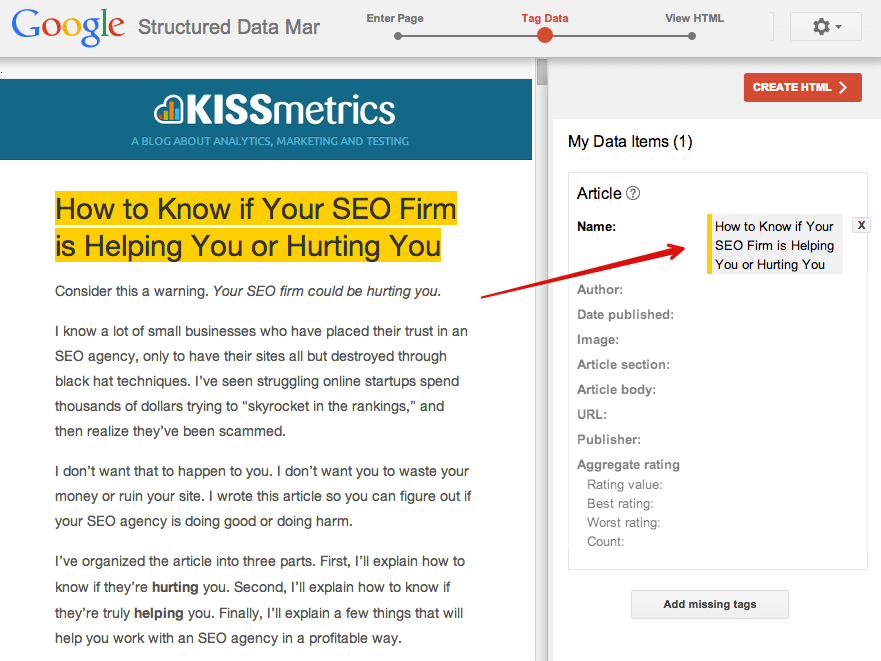
When I select “Name,” the tool adds it to “Data Items” in the right pane.
structured data markup

5. Continue adding markup items.

Use the list of data items as a guide, and highlight the other items in your article to add them to the markup list. You probably won’t be able to tag every item in the list. Just add what you can.

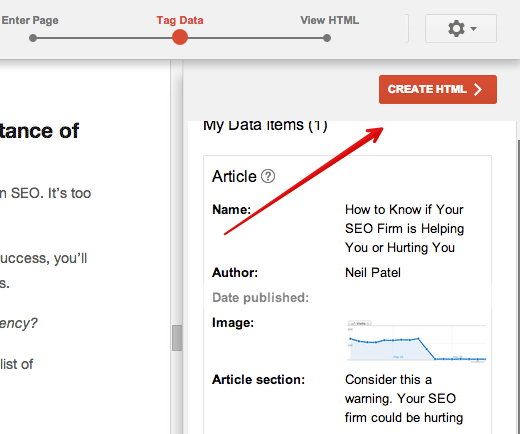
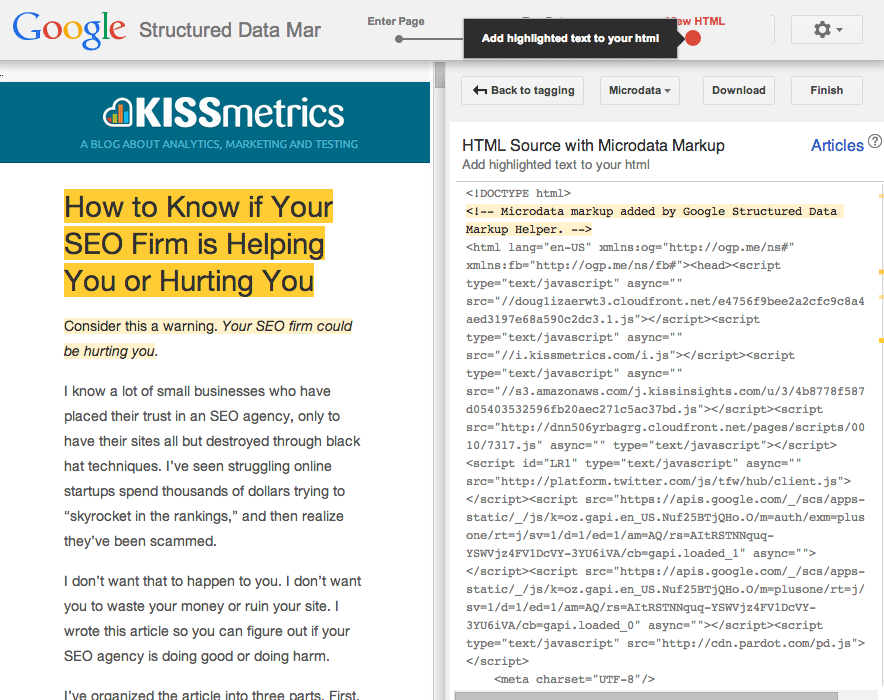
6. Create the HTML.

Once you’ve finished, click “Create HTML.”
create html
In the following page, you will see the HTML of your page with the relevant microdata inserted in the spots that you selected.
google structured data markup helper

7. Add schema markup to your web page.

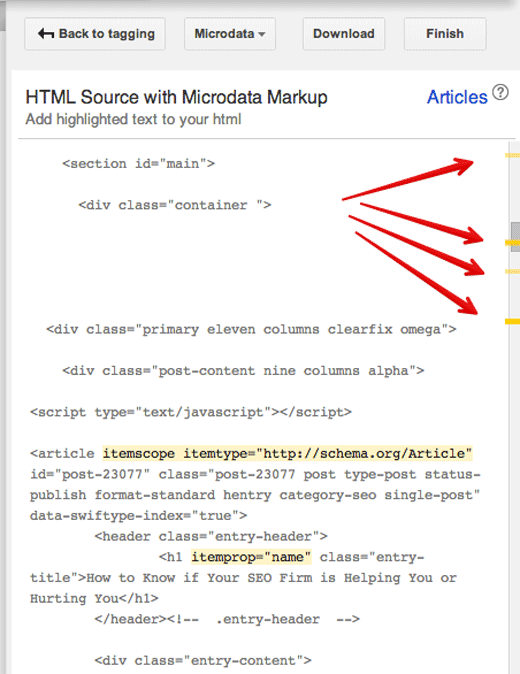
Next, you will go into your CMS (or source code if you’re not using a CMS) and add the highlighted snippets in the appropriate spots. Find the yellow markers on the scrollbar to find the schema markup code.
yellow bars that point to the correct markup
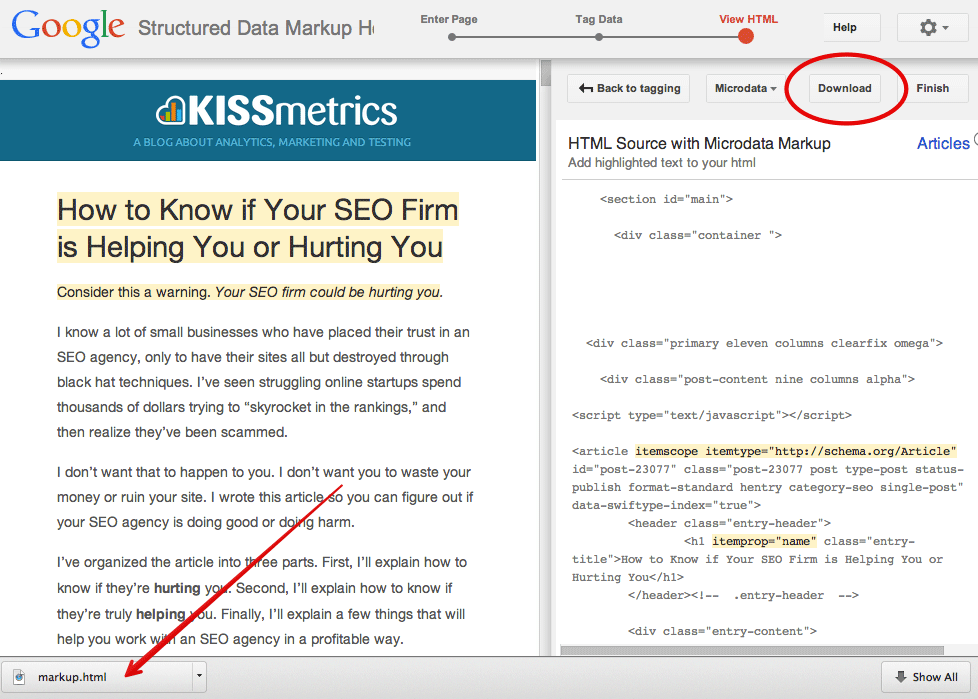
A simple alternative is to download the automatically-generated HTML file, and copy/paste it into your CMS or source code.
structure data markup download
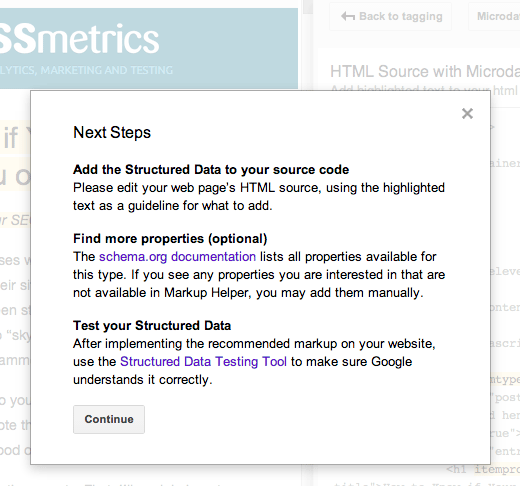
When you click “Finish,” you will be presented with a series of “Next Steps.”
next step

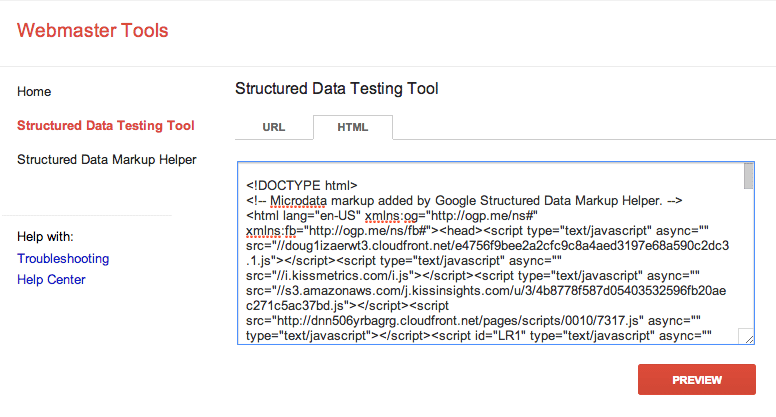
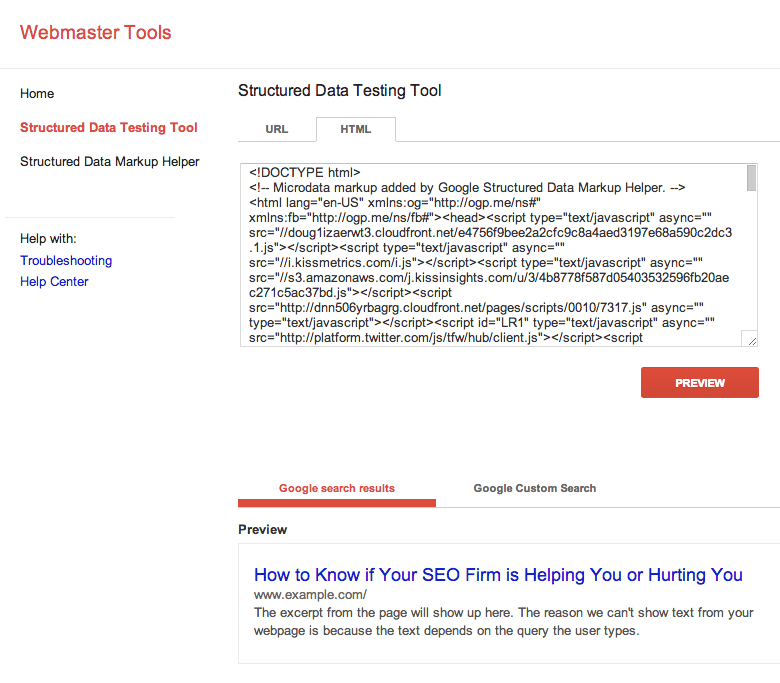
8. Use the Structured Data Testing Tool to find out what your page will look like with the added markup.

Instead of analyzing a published web page, I’m going to analyze the code that the tool generated for me, and which I downloaded.
structured data tool
Once the code is pasted, I click “preview.” The testing tool shows me what the article will look like in Google search results:
14 structured data testing tool
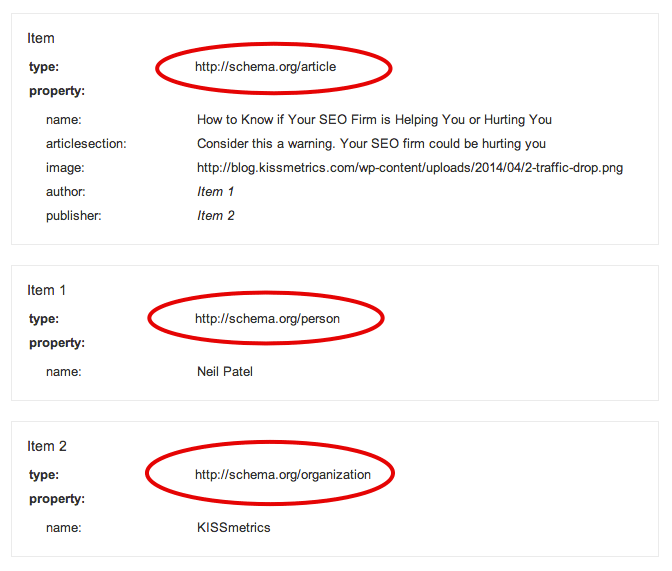
In addition, I can inspect every markup element that I added.
schema item type property
If necessary, I can edit the HTML directly in the testing tool in order to update the schema and preview results again.

Tips on using schema markup.

The purpose of this article was to get you started in the world of schema markup. It’s a big world.
The next few tips will show you how to dive even deeper, and gain even richer results from schema.

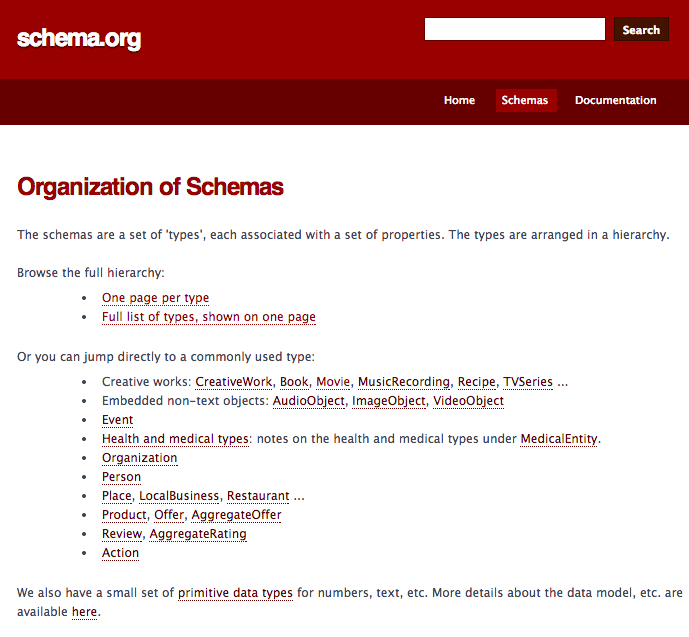
Find the schemas that are most commonly used.

Schema.org provides a list of the most common types of schema markup. You can visit the Organization of Schemas page to see this list. Check out the types that are best suited to your business.
organization of schemas

Find any and all schema types that you need.

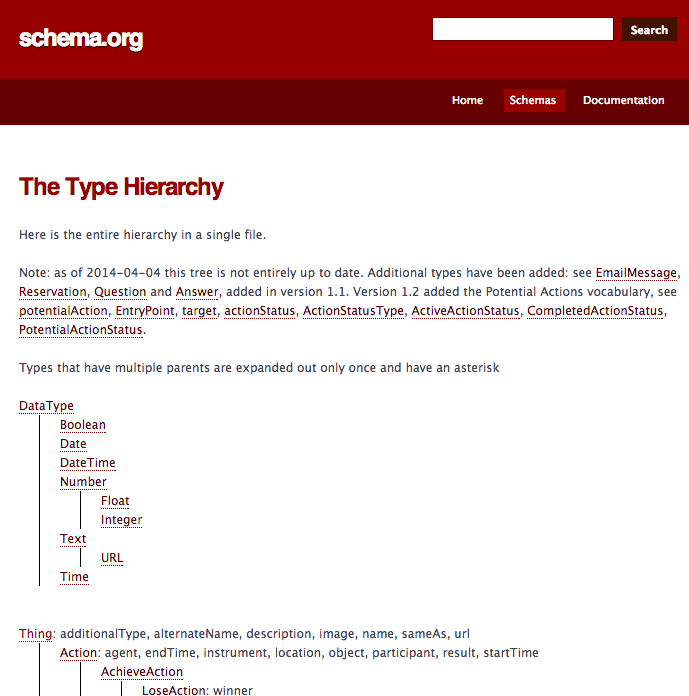
As I mentioned previously, there is a myriad of markup types. To get the full list, visit The Type Hierarchy. This master list provides most of the markup types that are available.
schema.org the type hierarchy

The more you markup, the better.

Schema.org’s instructions explain clearly, “the more content you mark up, the better.” When you start understanding the vast array of itemtypes, you begin to see just how much there is on your web page that you can mark up.
Keep in mind the disclaimer, however: “You should mark up only the content that is visible to people who visit the web page and not content in hidden div’s or other hidden page elements.”

Schema Markup for Now and the Future

As simple as schema markup is to implement, it’s surprising how few businesses and websites have taken advantage of it.
Schema markup is one of those SEO innovations that will probably be with us for a long time. Now is the time to learn and implement the relevant microdata to improve your search results. Doing so right away will put you ahead of the curve, giving you a leg up on the competition.
How do you use schema markup for your company’s website?