




14 Nov 2014

How to Change a Word Document to JPEG Format

This is a very simple way to convert a Word document into a JPEG format (picture). Doing this will allow you to use the document as a desktop wallpaper, which you can't do otherwise. You can also save it to your files to upload. And it's very easy.


Method 1 of 3: Snipping Tool Method For Windows Vista and 7 and Later

  1. Change a Word Document to JPEG Format Step 1 Version 2.jpg
    1
    Open your document and zoom out until you see the whole document.
  2. Change a Word Document to JPEG Format Step 2 Version 2.jpg
    2
    Go to "Start" > "All Programs" > "Accessories" > "Snipping Tool"
  3. Change a Word Document to JPEG Format Step 3 Version 2.jpg
    3
    Click and drag the box over the document.
  4. Change a Word Document to JPEG Format Step 4 Version 2.jpg
    4
    Save as what ever you want.
  5. Change a Word Document to JPEG Format Step 5 Version 2.jpg
    5
    To make the picture your desktop wallpaper, right click on the desktop and click "Personalize". Choose "Desktop background" > "Browse" and select the image you just saved.

Method 2 of 3: For Windows Versions with OneNote and Word

  1. Change a Word Document to JPEG Format Step 6 Version 2.jpg
    1
    Bring up the document you want in Microsoft Word.
  2. Change a Word Document to JPEG Format Step 7 Version 2.jpg
    2
    Go to File (2003, 2010) or the Office Button (2007) and go to Print.
  3. Change a Word Document to JPEG Format Step 8 Version 2.jpg
    3
    Select 'Send to OneNote' on the Printer Menu and click "OK".
  4. Change a Word Document to JPEG Format Step 9 Version 2.jpg
    4
    The document will open as a page in OneNote. Make sure this is the only page open on the tabs on the right (delete others if open by clicking on them and pressing the DELETE key). Then, go to File/Office Button, then Save As.
  5. Change a Word Document to JPEG Format Step 10 Version 2.jpg
    5
    Change the File Type/ Save As Type dropdown to 'Word Document'. Then Click SAVE.
  6. Change a Word Document to JPEG Format Step 11 Version 2.jpg
    6
    Open the new file in Word. It will open with the pages as pictures.
  7. 7
    Now right click on each picture of your page, and click Save As Picture. Save the picture and you're done!

Method 3 of 3: For Windows XP (Or Any Older Version)

  1. Change a Word Document to JPEG Format Step 13 Version 2.jpg
    1
    Bring up the document you want in Microsoft Word.
  2. Change a Word Document to JPEG Format Step 14 Version 2.jpg
    2
    Zoom in or out so that the whole document can be seen on the screen without scrolling up or down.
  3. Change a Word Document to JPEG Format Step 15.jpg
    3
    Find the "Print Screen" key on your keyboard. On a standard keyboard it should be located to the right of the F12 key, sometimes shortened to "prt sc".
  4. 4
    Once you've found the "Print Screen" key and the Word document is visible on your screen, press the key. Despite nothing appearing to happen, your computer has taken an image of the screen and stored it in memory.
  5. Change a Word Document to JPEG Format Step 17.jpg
    5
    Go to "Start" > "All Programs" > "Accessories" > "Paint".
  6. Change a Word Document to JPEG Format Step 18.jpg
    6
    In Paint, go to the "Edit" menu and select "Paste". A picture of the whole screen will appear.
  7. Change a Word Document to JPEG Format Step 19.jpg
    7
    Crop out what you don't want using the "select" tool, leaving just the document.
  8. Change a Word Document to JPEG Format Step 20.jpg
    8
    Save it as whatever you want.
  9. Change a Word Document to JPEG Format Step 21.jpg
    9
    To make the picture your desktop wallpaper, right click on the desktop and click "Properties". Choose "Desktop background" > "Browse" and select the image that you just saved.
Source from: http://www.wikihow.com/Change-a-Word-Document-to-JPEG-Format

12 Nov 2014

Making Money From Blog

Part 1 of 6: Laying the Groundwork

  1. Start Making Money Blogging Step 1 Version 3.jpg
    1
    Understand what a blog is. Define a blog as a type of website or part of a website often maintained by someone making regular entries of commentary, descriptions of events, or other material such as graphics or video. Most blogs are interactive, allowing visitors to leave comments and even message each other via widgets on the blogs and it is this interactivity that distinguishes them from other static websites. A typical blog combines text, images, and links to other blogs, web pages, and other media related to its topic. The ability of readers to leave comments in an interactive format forms a large part of a blog.
  2. Start Making Money Blogging Step 2 Version 3.jpg
    2
    Plan to write your blog in a tone appropriate to your blog topic. The most important part of any blog is what you have to say and how you say it. People will inevitably return to your blog if the subject you write about and the style in which you write it appeals to them. Keep it personable so as to invite interaction through blog comments and links back to your blog from other bloggers who like what you write.
  3. Start Making Money Blogging Step 3 Version 2.jpg
    3
    Choose a niche market and domain name. If you’re setting up a blog with the intention of making money, you need to find a profitable niche. Let’s assume that selling hair care products is a potentially profitable niche. A possible search term that someone might use for a hair care product might be "hair care shampoo," so an appropriate domain name would be "haircareshampoo.com".
    • Selecting a good "buyer keyword" is critical. Try to select one that pulls in readers that are ready to buy. Another good example of a long-tail buyer keyword might be "eczema remedy." This keyword probably has a high level of competition, but it's just an example. Think of the reader who is searching for this term. They likely have a problem (eczema) and they're already looking for a solution. If your blog is informative and well designed, there's a good chance you'll be able to monetize your traffic.
  4. Start Making Money Blogging Step 4 Version 3.jpg
    4
    Choose which blog software to use. There are a number of popular blogging software around, including Blogger and Wordpress. My favorite is Wordpress – in fact I created this blog using Wordpress, and that’s the one I’m going to use to help you setup your blog - it’s very simple to use, and it has many powerful features including plug-ins and web template system that uses a template processor
  5. Start Making Money Blogging Step 5 Version 3.jpg
    5
    Go to your new blog website. (Such as www.yourblogname.com) Substitute your actual domain name for "yourblogname".
    • Click on “Cpanel login.” If you don’t see "Cpanel login" to click then type this in the browser address bar +slash+cpanel. “www.yourblognam.com/cpanel using the actual name you registered.
    • Type in your username and password that you chose when you bought the "web hosting" provider. Should be in your BLOG FILE.
    • Scroll down to “Software/Services.”
    • Click on “Simple Scripts.”

    Part 3 of 6: Designing and Creating Your Site

    1. Start Making Money Blogging Step 11 Version 2.jpg
      1
      Create a blog design that reflects your blog's image. It’s important that you create a design that reflects the content and image of your blog - from your font to your color choices, make sure each element of your blog's overall design is consistent with your blog's image. For example:
      • In a serious blog about marketing, it would be confusing in readers' minds, if the blog design included cartoon like clipart, balloon fonts and glitter effects.
    2. Start Making Money Blogging Step 12 Version 3.jpg
      2
      Choose elements that often make up a blog including:
      • About Me
      • Categories
      • Posts
      • Contact
    3. Start Making Money Blogging Step 13 Version 3.jpg
      3
      Install a theme for your blog. Under appearance, click on "Themes" and then click "Install Themes". From here, you can browse through a number of different themes from which you can select one you’re happy with.
      • Download the theme plugin and save it in a sub-folder on your computer.
      • Open the zipped folder.
      • Click “extract all files”
      • Upload files or a folder to “wp-content/plugins” on your “remote server” via FTP on FileZilla.

    Part 4 of 6: Starting to Blog

    1. Start Making Money Blogging Step 14 Version 3.jpg
      1
      Write blog posts people want to read. It is a matter of speaking honestly and openly about a subject you're passionate about. The more you promote your blog, the more people will find it and the greater likelihood that some of those people will read what you have to say, like it,
    2. Start Making Money Blogging Step 15 Version 3.jpg
      2
      Use strategies to drive traffic to your blog:
      • Email Marketing: send emails to your contacts who might be interested in your blog and suggest that they forward your link to their contacts.
      • Participate in blog carnivals. Search online for them or check out BlogCarnival.com.
      • SEO: Optimize your site for search engines. One software I recommend is WebCEO, and there is a free version of it.
    3. Start Making Money Blogging Step 16 Version 3.jpg
      3
      Post relevant comments on related blogs for exposure to those readers. Register as a member using "yourblogname.com" as your username and:
      • Build links to your blog by posting comments on other blogs that have “dofollow” links which means that search engines will see those links. That helps to improve your exposure.
    4. Start Making Money Blogging Step 17 Version 2.jpg
      4
      Do video marketing. Creating a video for marketing is much easier than you think. The best software used for making a video is Animoto.
    5. Start Making Money Blogging Step 18 Version 3.jpg
      5
      Promote your blog. Use sites like "Yahoo! Answers" to drive traffic to your blog. You can also drive more traffic to your blog using some of the social networking sites:
      • Twitter
      • Facebook
      • LinkedIn
      • StumbleUpon
      • Digg
      • Reddit
    6. Start Making Money Blogging Step 19 Version 2.jpg
      6
      Be persistent and write good content . Once you have the basics down you’ll continue developing and learning more.

    Part 5 of 6: Making Money

    1. Start Making Money Blogging Step 20 Version 3.jpg
      1
      Get help from friends. One way to get a friend like this is to join a forum, like Digital Point, which is full of people looking to help each other for online business.
    2. Start Making Money Blogging Step 21 Version 2.jpg
      2
      Be smart about what programs you buy into.
      • Stay away from buying How to ebook scams about making money online.
      • Consider buying a system and eprogram that can completely automate everything -- from e-sales, e-credit card usage and e-downloads (delivery online) -- to everything else that is needed to keep sales, customer info and operate a successful business online.
    3. Start Making Money Blogging Step 22 Version 3.jpg
      3
      Choose, create and sell your own "e-product" that people will want to buy:
      • Information e-products may be quick to create and quick to market. The product that you would sell is digital and your space taken up is on your computer and on the online site harddrive. This method does not take years, nor require much help, nor take great funds to manufacture. You can create information products in as little as a a day or two, post it, and begin generating revenue. You need a special topic and a computer (no stock, no mailing or counting inventory). This takes no space in your garage, house nor a store because you do not have to buy any products to sell. For example:
        • Create a good ebook yourself and make money by marketing that online.
        • Create an "e-store" yourself and make money by marketing several e-products online.
    4. Start Making Money Blogging Step 23 Version 3.jpg
      4
      Sign-up for "Pay Per Click" with a site(s). With such a service, you get paid for visitors on your site clicking on other peoples' ads to be redirected to that other site. That may work by creating cookies that give you credit for sending a [legitimate] client. For example:
      • Google’s Adsense program: Google will read your article that you write and find "ads that are relevant" to it and display them next to or within the article. Having very relevant ads, can be of benefit to the readers, too.
    5. Start Making Money Blogging Step 24 Version 3.jpg
      5
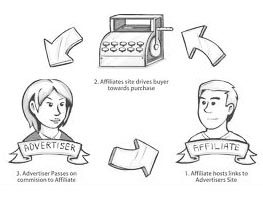
      Do affiliate marketing. In this process, you sell someone else's products, but you must learn how to connect with your buyers on a more fundamental level, using unconventional strategies and techniques, mixed in with more conventional methods such as the pay per click.

    Part 6 of 6: Creating a Community

    1. Start Making Money Blogging Step 25 Version 2.jpg
      1
      Keep it up. As you write quality content, your audience will start to build. The building of followers makes creating a membership site a logical way for readers to communicate with each other via forum, or messaging.
    2. Start Making Money Blogging Step 26 Version 3.jpg
      2
      Consider memberships. Membership sites are a terrific way to make money. You charge a small monthly fee for users to gain access to exclusive content, video content, or possibly direct access to you through Q&A or live events.
     Source from:http://www.wikihow.com/Start-Making-Money-Blogging

10 Nov 2014

Ways To Make Money Online


How To Make Money Online 
If you’d claimed it was possible for the average guy on the street to make millions of dollars online just a decade ago, the chances are good you’d have heard nothing but laughter in response. Today, though, there are countless Internet millionaires who turned a great idea into obscene profit, used the power of the web to promote their offline business or simply worked their butt off to sell their skills online.
While it’s unlikely that you’ll ever earn enough to buy your own private island, there’s nothing to stop you from using your skills to make a comfortable living online. In fact, while the media would have you believe that online success stories are limited to just a few lucky, hard working people who stumbled on a great idea that went on to make millions, the reality is that there are tens of thousands of people who make a living exclusively online. Here are just ten ways you can join them.

How To Make Money Online


1. Sell Stock Photography

Sell Stock Photos OnlineThe Internet has caused an explosion in the demand for stock photography. As the number of media and commercial outlets has increased dramatically with the growth of online media there’s an enormous need for high quality stock photos.

Yuri Arcurs is the man everyone turns to for their stock photo needs. As the world’s top selling stock photographer he sells an image every 8 seconds, 24 hours a day (that works out to over 4 million images each year). Arcurs makes millions of dollars each year simply by being the best at what he does. There are lots of great photographers in the world and the barrier to entry is as low as ownership of a camera, but Arcurs has managed to build a reputation online for consistent, high quality and imaginative images.
If you’re a professional photographer (or even just a hobbyist) you should consider the possibilities of selling stock images online.

2. Tweet For Sponsors

Sponsored TweetsSponsoredTweets.com is an online platform that allows you to make money on Twitter by charging sponsors for communicating their advertising messages to your followers. You set the amount you want to get paid for every tweet you make, choose a category and select keywords you want to work with. You then wait for advertisers to contact you and take you up on your offer, paying you the amount you specified for each tweet that you make.
All throughout the process, the tweeter has full control over his or her account, and may choose the wordings of the tweets, or may choose to reject the tweet altogether.

3. Blog for Ad Revenues

Google Adsense Money OnlineIf, however, you already have a blog with a devoted following it should be easy for you to leverage your readers into hard cash. Ad networks such as Google AdSense pay big money to place their ads on your site, and you’ll receive a payment every time a reader clicks one. While it’s easy to go overboard and fill every spare pixel, if you place your ads well it’s possible to make a comfortable income from your site.
One of the most successful bloggers around today is John Chow, a Canadian blogger who makes more than $40,000 a month through ad sales and other revenue streams. Ironically, his blog is about ways to make money online.

4. Sell Affiliate Products

Affiliate marketing money onlineIf you have a flair for sales copy you could try your hand at selling products for affiliates. While many people take the seedy route of selling diet pills and penis enlargement products, if you want to keep your conscience clear you’ll find that Amazon runs a very successful affiliate program that allows you to make money advertising any of the products for sale on their site. eBay also have a pretty good affiliate setup, with their top affiliates earning $1.3 Million a month, WOW!

5. Write an e Book

make money sell ebook onlineIn recent years the self-publishing world has exploded online to the point at which you don’t even have to run your own site in order to promote a book. Amazon, Barnes & Noble and Kobo are just a few of the sites on which you could self-publish today, with commission rates of around 70% available on every sale.

The number of eBooks on Amazon reached 8 million last year, and Amazon stated that eBooks are outselling hard backs 2 to 1, 62% of ebook sales fell into the Thriller and Mystery genre, so if you feel that you could pull this style of genre off then you will be in for a good chance of sales.
26 year old self published author, Amanda Hocking from Minnesota makes more than $2 Million a year from her ebook sales. Amanda Hocking’s stories about, trolls, vampires and zombies and  ‘supernatural teen romances’ sell for $2.99 or for as little as $.99.

6. Become a Virtual Assistant

Virtual AssistantEvery small businessman would love to hire a full time assistant to take care of the little things, but many simply can’t afford one. Thanks to the Internet, though, they can now hire part time assistants who work for a whole host of clients, and all at a much lower cost than a full time staff member.

If you work from home this may be a perfect opportunity to make a consistent income. Virtual assistants can earn $20 an hour in return for booking travel tickets, interacting with clients and dealing with the daily needs of small businesses.

7. Lease Your Skills

make money online outsourceMost people have at least one skill that carries a market value, though until now that skill may have been impossible to monetize in the traditional job market.

Sites such as 99Designs, Elance, Freelancer and iWriter allow people to hire out their skills as writers, coders, designers, translators and lots more on a contract basis. Freelancing sites are a great way to boost your income in your free time, and with enough motivation and hard work you could find yourself earning a comfortable full time income from them.

8. Selling on eBay

Make Money On eBayeBay is a great way to turn your unwanted things into a little spending money, but it isn’t just a place to sell your old Star Wars action figures. In fact, eBay’s global marketplace can offer a great way for canny traders to buy and sell their way to profit. By buying wholesale you can sell anything with a mark up. Even better, if you have the skills to make things people want to buy you could start your own home-based craft business, selling to customers around the world.

Matt & Amanda Clarkson are a successful couple who so far have managed to make over $8 Million in eBay sales.

9. Become A Mobile App Tester

test iphone appsPeople that are rather uncertain of their application development potential can still make some money through the usage of iPhone apps.
People that have the time and desire to test iPhone apps and discover bugs can be rewarded payments for their efforts. uTest is one such application. Individuals that have signed up will also build some reputation on the basis of the testing they have done so far.
Better reputation signifies access to more profitable app testing opportunities.

10. Designing T-Shirts

design tshirt make moneyFinally, if you have something of an artistic streak you could kick off the next viral sensation with your own range of funky, arty t-shirts. Sites such as CafePress allow users to upload their own t-shirt designs and sell them on their personal online store.
You can also contact distributors such as threadless.com or designbyhumans.com to release your t-shirt designs to the masses.