26 Nov 2014

How to add Blogger Contact Form in Side Bar and inside Contact us page


It’s a frustrating job when I try to add contact form in my blogger contact us page. Since, by default blogger only provides a widget to add contact form in your side bar therefore you need some coding techniques to add it inside your contact us page. However you can find those coding by searching on internet but for me the problem arises when my submit button was not working. All of my fields are working fine except submit button. It was the most frustrating time that I had ever faced. I worked for 2 hours to add that contact form in a page but at last the result was noting. At last I thought of adding my own contact form instead of using blogger’s form and then I found a way to add a perfect working blogger contact form in contact us page.
Before learning the trick to add contact form inside of your contact us page lets learn to add it in the sidebar.

How to add Blogger Contact Form in Side Bar

Before starting this guide I hope that you are logged in inside of your dashboard.
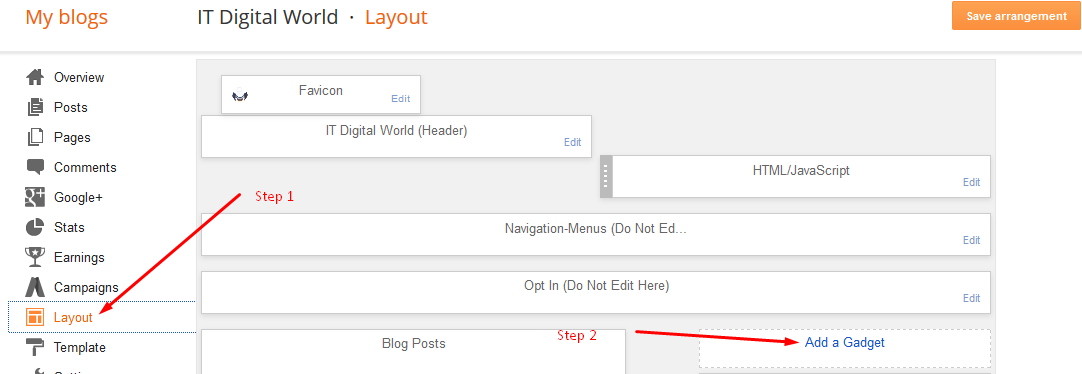
Step 1: Click on Layout tab which is available in your dashboard and then click on Add a Gadgets which you can see after clicking on Layout.
Add-Blogger-Contact-Form-in-Side-Bar

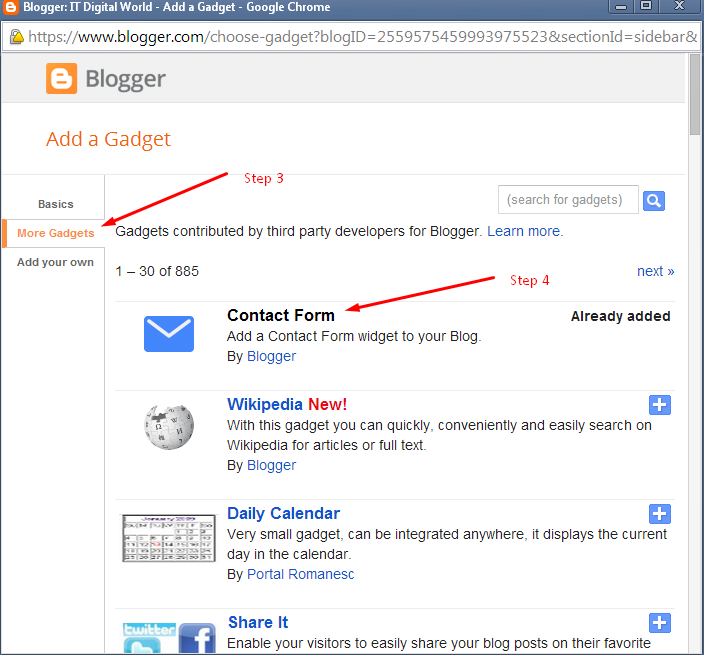
Step 2: After Clicking on Add a Gadget a new window will pop up showing you different kinds of gadgets that you can add  to extend your blog functionalists. Click on More Gadgets and now you can see contact form, add it and then click on Save arrangement.
contact-form-in-blogger
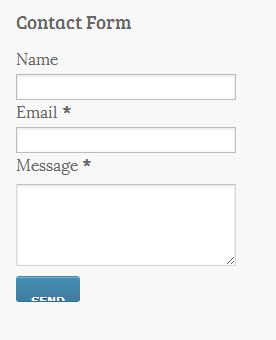
It’s over now you can see a perfectly working blogger contact form in your side bar.
blogger-contact-form
Now, let’s get started and learn the trick to add a working blogger contact form inside of your contact us page.

How to add blogger contact form inside contact us page

The contact form that I am going to add inside of my blogger contact us page is provided by a third-party website  foxyform. Just go to that link and create a form.
So, the question is how to create a contact form?
Just follow these steps and learn to create a perfect contact us form for your blogger blog.
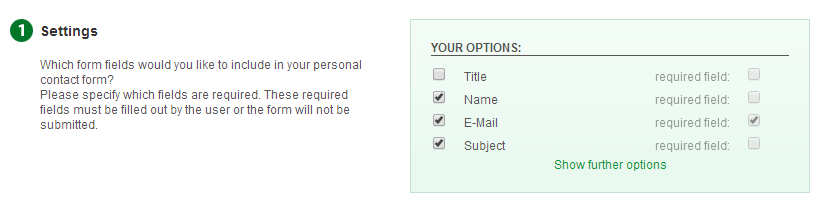
Step 1: Select the required field that you want to include inside your form. For example I want to add Name, Email and subject therefore I will select those fields.
 blogger contact form in contact us page
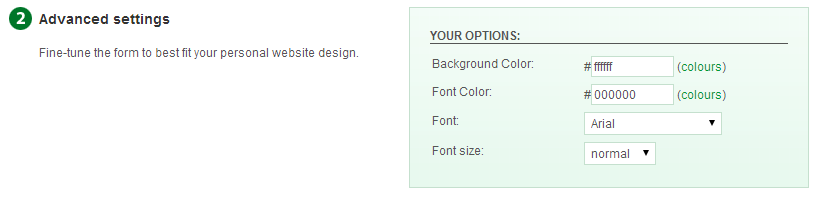
Step 2: Select the color of your form according to your website color scheme or leave it as default.
foxyform contact us form
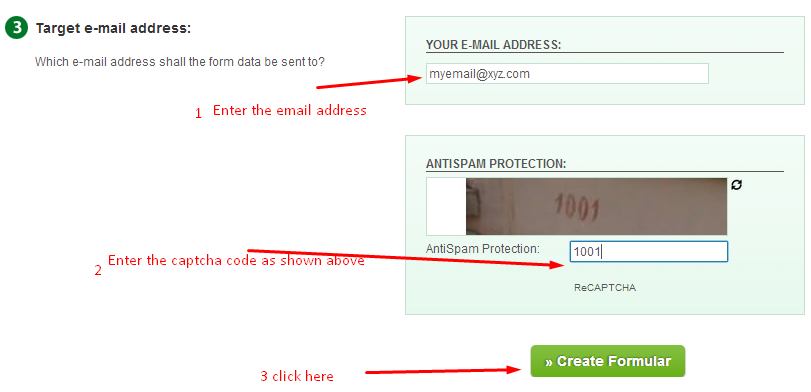
Step 3: Insert the email address where you want to receive your message and type the captcha  and then click on Create Formular
foxyform contact us form

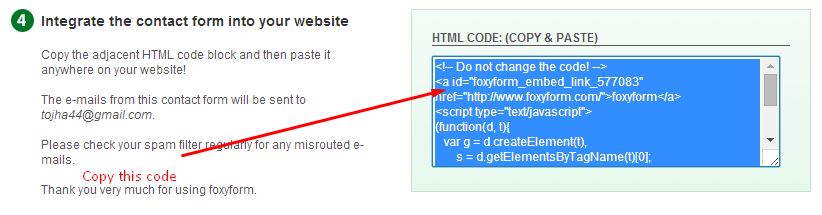
Now you will receive a code for your contact us page copy that  code and go to your blogger dashboard.
foxyStep 4: Create a new page from Pages>New Page and give the title as Contact Us.
creating page in blogger
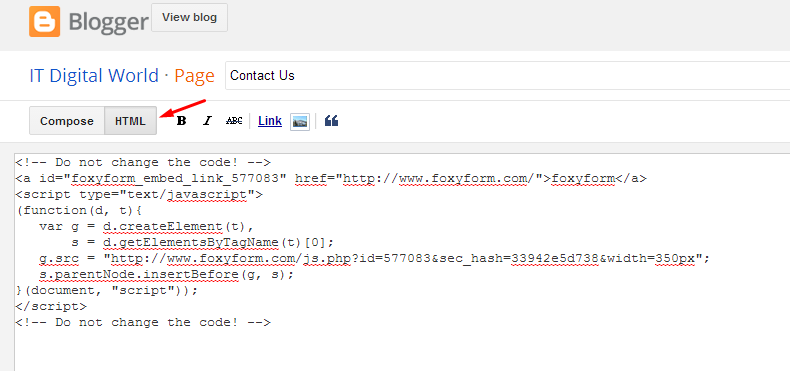
Step 5: Edit the page in HTML mode and paste the code that you have copied already.
blogger contact us form
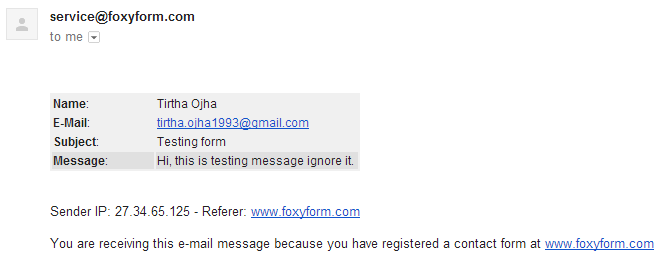
Save it and now you have added a perfect working  blogger contact form in contact us page. Below you can see the screenshot of its demo message.
Contact us form test

Conclusion

However, you can add the default blogger contact form in the sidebar of your blog but I don’t think its good practice to add a contact form in the sidebar. Since, you need some coding to add that form inside of contact us page and to replace that issue I used foxyform as an alternative of default contact us form.

Source : Tirtha Oiha

25 Nov 2014

Let make Money While You Sleep

Turn Your Sleeping Time Into Money

passive Income online while sleeping 

Passive income online is something of a holy grail. Everyone wants to “make money as they sleep.” After all, if you can take care of paying the rent without having to spend your time massaging spreadsheets all day, you can do something more worthwhile with your life.
That’s why we are offering you: 10 Great Ways To Make Money While You Sleep.

10 Great Ways to Make Passive Income Online

As with any business that a large number of people want to enter, the widely known sources of passive income have enough people entering those markets that you can expect lots of competition. Your success depends on whether or not you are able to jump the various barriers to entry that inevitably appear. Unfortunately, jumping those hurdles can (if you’re not careful) seriously reduce the “passive” side of passive income online. Certainly in the beginning, passive income can make for longer (sometimes much longer) working days than traditional income.
Once income is coming in, you may still need to check on things and put in work to keep it going. The mindset of someone who succeeds in passive income is not that of “get it done and go surfing.” You need the mindset of an investor. Passive income always starts with a significant investment: if you buy real estate, it’s a financial investment. If you want to make passive income online, you’ll almost certainly invest a very significant amount of time.
The process of making passive income online involves three choices:
- Your business model
- Your niche
- Your target market.
Once you know these, you can implement your business idea, test, and repeat until you have the income you want.
For all the noise about income online, the process is remarkably simple. Try not to get distracted by the flashing lights and shiny objects along the way.

1 - Build an affiliate blog

Affilliate Online moneySet up a blog, promote the blog, and use it to promote affiliate offers. This is by far the best known way to generate a source of passive income online.
Start with an affiliate site like ClickBank or Commission Junction. Find a few offers in a category that you know a bit about. Ideally offers with some degree of recurring income. Make sure they have good numbers, and do your keyword research to make sure there’s demand. After figuring out what keywords to optimize your blog for, start a new blog and write articles. SEO optimize the blog, and promote it around the web. Once the traffic numbers start going up, deploy some ads for affiliate offers. People click on the ads, and you get paid.
Now repeat the process until you have ten or twenty blogs, or maybe hundreds if you want to
Make money online

2 - Put together an auto-responder list
Make Money Online Squeeze PageOne of the Internet’s most common business models. Once you know approximately what kind of market you want to attract, put together a free product or information people can download if they give you their email. Now drive traffic to a “landing page” that asks for the visitors’ email address. You can even install plug-ins nowadays called Squeeze pages that pop up with an e-mail sign up box when people visit your page. This is a great way to build subscribers and a sales funnel to sell to.
Use an auto-responder like aWeber to email your subscribers the link to download the product or quality information you have to offer, and follow-up with a series of (automatically sent) emails. Spread over weeks and months, build some rapport with your subscribers and then try to sell them on any number of products or affiliate offers. Make sure you break it up though, you need to offer something of value and every few mail outs or so you can send them a link to the product you wish to sell them.

3 - Create a membership community

Make Money Online Membership CommunityThis is a natural follow-on to the first two methods. If you establish yourself as a worthwhile source of information, you can charge people a membership fee to receive more information or more access. You get recurring income in exchange for your research and time spent producing high-quality content. For truly passive income, you don’t produce the content at all, and instead pay others. Quality control becomes the main challenge then.
Timothy Sykes who is a self-made millionaire through his penny stock trading and membership website has proven that membership communities do work, and very well may I add.
Find out how Timothy Sykes makes a cool $125,000+ per month of passive income online with his membership community.

4 - Sell commercial products online

Shopify - Sell Online Make MoneyCustomers are buying products online at an extensive rate nowadays. This means that there are a large number of customers looking for exactly what YOU can supply them with.
Checkout Shopify.com. They supply you with all the tools you need to sell online.
A number of people have proven that this is a great platform to sell products online. Put up a page and promote it. People pay you money. The product gets delivered to them, while you kick back as the money rolls in.
If Shopify is not your thing then you can always try your luck with eBay. You know what they say, “One man’s trash is another man’s treasure”, so scour through your cupboards and sheds  and sell off some of your unwanted treasures.

5 - Arbitrage services

middle man make money onlineIf you can find a market willing to pay significant amounts of money for a service (like writing or design), and a source of labor that provides the needed quality for a lower price, you can arbitrage the two. You act as the “middle man”, “the hook up”.
Funnel the expensive work to the cheap source and profit off the difference.

6 - Find Sponsors for Articles or Regular Columns

sponsorshipsSome website or blog categories tend to be more popular than others. These can be monetized through sponsorship of a product, logo or mentions of the sponsor.
Try to find a sponsor for the articles that tend to attract the biggest number of visitors. The column can be branded or an ad can appear inside a visible open space of the article. Just note that the article or announcement is sponsored by “so and so company”, not only is this good because you are being honest with your visitors, it also shows other potential advertisers that this as a lucrative and effective option that you offer.

7 - Sell your own information product

Make Money Sell Your Own Product OnlineThis is just like selling an eBook, except you publish and sell it yourself (generally) and it can come in the form of an eBook, DVD, software, audio book or VHS video.
When selling your own information product it allows you to keep a higher percentage of the profit. You have greater flexibility with upsells and landing pages compared with selling your products on a 3rd party site, and you can even use this to build your list (see #2), two birds with one stone ;)


8 - MLM / network marketing

Multi Level Marketing - MLMFor people who are willing to put in the time understanding just what MLM (Multi Level Marketing) is. The problem with this approach is that it’s very close to a pyramid scheme. In essence, you make money from signing up people who sell the product. A number of highly reputable entrepreneurs such as Donald Trump & Robert Kiyosaki are big fans of Multi-Level Marketing.
Do your research first and make sure that it is a product line you are familiar with and passionate about selling otherwise you will be wasting your time and your friends and family may laugh at you when you approach them with your sales pitch.

9 - Sell advertising

Sell Advertising Online Make MoneyThis is very close to #1, but takes much more traffic. In order to make money while you sleep, the site has to be self-sustaining and self-maintaining, which isn’t the easiest thing to do, but is quite possible.
With enough traffic the advertising revenue becomes passive income.
You will make money while you sleep and the hard work will finally pay off. A good way to look at it is, within the first few months you may be earning around $10 – $20 dollars per day (That’s a McDonald’s meal or a full tank of gas), but as you persist and create new content your traffic will grow and so will your earnings, you may even get to the point where you could be making $100 per day, that’s a new pair of shoes each and every day or a flight to a nearby city of your choice per week.


10 - Peer to peer lending

peer to peer passive income onlineRisky and capital-intensive, peer-to-peer lending involves lending money to people over the internet — generally to people who can’t get credit any other way.
Peer-to-peer lending is very similar to ordinary investing, except with a different asset class and payoff structure. This one is often a last resort but has proven to make good for those who run things the right way and do their homework before they launch.


Article By: James Meyer & Joel Brown

 

14 Nov 2014

Loài cây ngăn đói khát cả tuần

heath-pea3-550x466-3959-1415690550.jpg
Cây Lathyrus linifolius có hoa màu tím. Ảnh: Scotland Wildlife
Lathyrus linifolius (thuộc họ Đậu) là một loài cây có hình dạng giống dương xỉ và có hoa màu tím. Theo các tài liệu nghiên cứu, chúng từng là thành phần quan trọng trong chế độ ăn uống ở vùng cao nguyên Scotland cho đến khoảng thế kỷ 18, khi nguồn thức ăn khan hiếm.
Phần củ có kích thước như hạt đậu được tách ra khỏi rễ và được sấy khô. Một vài củ có thể cung cấp năng lượng cần thiết và ngăn các cơn đói và khát trong thời gian dài. Người dân tại đây được cho là từng sống nhờ loại củ này khi mùa vụ thất bát.
Theo tài liệu thế kỷ 17, các tu sĩ từng sử dụng loài cây này để chữa trị cho bệnh nhân từ đầu thế kỷ 14, trong khi binh lính của Julius Caesar cũng từng ăn rễ cây trước trận chiến năm 48 trước Công nguyên.
Tiến sĩ Moffat, người đứng đầu một chương trình khảo cổ, cho biết củ của loại cây này có vị cam thảo và mùi hương giống cây hồi. Sau khi ăn củ, con người sẽ không có cảm giác muốn ăn và nhớ đến việc ăn uống trong nhiều tuần, thậm chí nhiều tháng. Vị ngọt lạ có thể là transethanol, một chất ngọt gấp 300 lần so với đường và có thể cung cấp năng lượng.
Do cây khoai tây ngày càng được trồng phổ biến, nên cây lathyrus linifolius dần bị lãng quên và chỉ mới được phát hiện trong nghiên cứu gần đây. Các chuyên gia tin rằng cây lathyrus linifolius có thể được ứng dụng trong thế giới hiện đại, cải thiện tình trạng dư thừa chất béo ở người.
Một doanh nhân có tên Richard Swift dự định tài trợ cho kế hoạch thử nghiệm đặc tính của cây, hướng đến mở rộng trồng ở vùng nông thôn của Scotland. Mục tiêu của Richard là cứu đói và duy trì năng lượng.

Source from: vnexpress.net

Mã độc trên iPhone, iPad dù không bẻ khóa

Không jailbreak hay kết nối với máy tính song thiết bị chạy iOS có thể bị nhiễm phần mềm độc hại đánh cắp thông tin người dùng khi cài ứng dụng từ ngoài App Store.


Thông tin về  phần mềm độc hại ảnh hưởng tới hàng trăm nghìn người dùng tại Trung Quốc vừa được công bố thì nền tảng iOS lại nhận tin về một loại virus mới còn nguy hiểm hơn. Mã độc này được biết đến với tên gọi "Masque Attack" và theo công bố của nhóm bảo mật FireEye, giống như WireLurker, virus mới tác động đến iPhone, iPad dù thiết bị này không được bẻ khóa (jailbreak).
iphones-ipads-2014-7769-1415673373.jpg
iPhone, iPad không bẻ khóa, không kết nối với máy tính đều có thể bị nhiễm mã độc.
Nhóm nghiên cứu cho biết, Masque Attack tấn công người sử dụng bằng cách giả mạo các phần mềm trên iOS. Các ứng dụng mạo danh được xây dựng giống hệt phần mềm gốc nhưng bí mật chèn thêm các mã độc nhằm truy cập thông tin cá nhân và có thể dùng dữ liệu trên cho mục đích riêng. Phần mềm này được cài đặt thông qua công cụ dành cho lập trình viên, như vậy nếu người dùng chỉ tải ứng dụng từ App Store thì không có nguy cơ bị nhiễm.
Mã độc Masque Attack không thể giả mạo những phần mềm mặc định của Apple như trình duyệt Safari hay Mail nhưng nó rất khó bị phát hiện khi “ẩn danh” dưới các ứng dụng do bên thứ ba phát hành. Chẳng hạn người dùng nhận được thư điện tử có chứa đường dẫn tải về trò chơi Flappy Bird hay ứng dụng Gmail nhưng thực chất đây lại là phần mềm chứa mã độc.
Nói Masque Attack nguy hiểm hơn phần mềm độc hại WireLurker đã phát hiện trước đó bởi mã độc mới tấn công trên nhiều bản iOS như 7.1.x, 8.0, 8.1 và cả bản 8.1.1 beta có thể được phát hành tới đây. Ngoài ra Masque Attack lây lan trên iPhone, iPad dù thiết bị này có được bẻ khóa hay không và không cần kết nối với máy tính thông qua cổng USB như với WireLurker.
Nhóm FireEye cho biết họ đã liên lạc với Apple về vấn đề này nhưng công ty Cupertino không đưa ra bất kỳ phản hồi nào. Tuy nhiên người dùng có thể tự bảo vệ mình bằng cách không cài đặt bất kỳ phần mềm nào từ ngoài kho ứng dụng App Store.

Những cách kiếm tiền online uy tí

Những cách kiếm tiền online uy tín mà bạn nên tham gia.

Chắc chắn là không ít lần bạn tìm kiếm làm thế nào để kiếm tiền trên mạng trên google và hẳn là không ít các trang hiện ra hướng dẫn bạn những cách kiếm tiền online uy tín từ a đến z…. Hứa hẹn sẽ trả lời bất cứ thắc mắc nào, lại còn thêm một vài câu chào mời rất hấp dẫn như:
“Bạn cứ đưa nick mình lập acc cho, rồi mỗi ngày cứ việc click là có tiền thôi?”
hay như
“Bạn cứ làm đi, mình gửi link cho đăng ký, đăng ký xong làm có gì cứ hỏi mình chỉ tất”
bla bla bla
Nạp thẻ điện thoại - Nạp card online

Đừng bị đánh lừa bởi những lời chào mời về cách kiếm tiền online dễ dàng

Thú thật với các bạn là mình cũng từng gặp những điều như vậy khi mới chập chững bước vào thế giới kiếm tiền online, và mình đã làm theo những lời chào mời như thế đấy. Giữa một ma trận đầy rẫy như thế, biết tìm đâu ra cách kiếm tiền online uy tín thực sự được đây?

Kiếm tiền online có thực sự dễ dàng?


Cách kiếm tiền online uy tín ở Việt Nam có dễ dàng

Liệu có cách kiếm tiền online thực sự dễ dàng

Trải qua nhiều lần tham gia vào nhiều linh vực kiếm tiền online, mình đã có chút ít kinh nghiệm cũng như trải nghiệm. Theo như ý kiến riêng của mình, thì có những cách kiếm tiền online mà bạn nên hoặc không nên tham gia, lý do vì sao mình sẽ trình bày chi tiết ngay ở dưới đây.

Các cách kiếm tiền online không nên tham gia.

1. PTC (Paid to click)

Hình thức này thì nổi tiếng từ xưa đến nay rồi, cũng có vài người kiếm được tiền, khoảng vài chục đến hơn trăm đô 1 tháng, nhưng số người tay trắng sau cả mấy tháng trời hì hục làm cho 1 trang scam thì còn lớn hơn gấp mấy lần.
Mình không khuyến khích cách kiếm tiền online này bởi vì mất thời gian, phải đi kiếm người để trở thành người giới thiệu và ăn hoa hồng từ cấp dưới. Không bổ sung được nhiều kiến thức. Nhiều khả năng bị lừa bới những trang scam. Riêng đối với bản thân mình thì hình thức kiếm tiền này mình cho là lừa đảo.

2. Đọc email quảng cáo

cách kiếm tiền online này cũng khá là phổ biến ở nước ngoài, mỗi ngày bạn sẽ được nhận 1 loạt email quảng cáo và nhiệm vụ của bạn là đọc từng email và nhận điểm. Cũng tương tự như hình thức PTC, mình không khuyến cáo bạn kiếm tiền theo cách này, scam thì nhiều mà chân chính thì ít, mất thời gian check mail mà tiền kiếm được thì cò con.

3. Chia sẻ tài liệu (PTU)

Đây là một cách kiếm tiền online cũng khá hay, bạn chia sẻ tài liệu cá nhân của bạn, nếu người khác thấy cần tài liệu của bạn thì họ sẽ trả tiền để download và bạn nhận được tiền.
Tuy hình thức tốt nhưng bạn có thể vướng vào rắc rối với bản quyền. Đặc biệt là nếu bạn upload những tài liệu của người khác để kiếm tiền, bạn có thể gặp rắc rối với pháp luật đấy. Một trang web ở Việt Nam có hình thức này mà bạn có thể tham khảo là: kilobook.com
Riêng mình thì mình không khuyến khích hình thức này bởi vì nó liên quan đến việc vi phạm bản quyền mà mình thì không thích đánh cắp bản quyền cũng như bị người khác đánh cắp bản quyền của mình.

4. Chứng khoán, cờ bạc, cá độ (Forex + betting)

Cách kiếm tiền online này có thể giúp bạn kiếm tiền nhanh, nhưng không bền vững, rủi ro cao và có nhiều khả năng chịu trách nhiệm pháp lý nếu không cẩn thận. Do đó mình cũng không khuyến khích các bạn kiếm tiền online theo cách này.
Một số hình thức khác như: giới thiệu bạn bè vào hệ thống rồi viết bài thật nhiều, upload ảnh kiếm tiền, kiếm tiền bằng việc giới thiệu người truy cập trang web…. Tất cả đều lừa đảo là phần nhiều, những site uy tín rất ít và khả năng kiếm thêm thu nhập một cách bền vững từ những cách trên là rất thấp.

Vậy làm thế nào để tìm được cách kiếm tiền online uy tín và hiệu quả?

Các cách kiếm tiền online uy tín nên tham gia

Nghiên cứu các cách kiếm tiền online từ lâu, có những hình thức mà sau một quá trình tìm hiểu, mình khuyến khích các bạn nên xem xét và tham gia. Bởi vì những hình thức đó không chỉ giúp các bạn gia tăng kiến thức mà còn đem lại nguồn thu nhập bền vững, lâu dài và không giới hạn. Thu nhập bao nhiêu là tùy thuộc hoàn toàn vào khả năng của bạn. Nhưng một điều chắc chắn là khả năng kiếm tiền trên mạng là hoàn toàn có thể chứ không hề lừa đảo như mọi người thường nghĩ.
kiếm tiền online uy tín với affiliate marketing

1. Xây dựng trang web theo chủ đề bạn yêu thích và cho đặt quảng cáo.

Hãy thử tưởng tượng, nếu bạn sở hữu một trang web với hàng ngàn lượt truy cập mỗi ngày thì các công ty có muốn đặt quảng cáo trên trang web của bạn không? Hẳn nhiên là có rồi phải không nào?
Càng nhiều lượt truy cập thì giá quảng cáo của bạn càng cao, thu nhập vài trăm đến vài ngàn đô la 1 tháng từ việc cho đặt quảng cáo lên trang của bạn là hoàn toàn có thể. Đây là một cách kiếm tiền online được nhiều người sử dụng nhất. Bạn có thể tìm hiểu giá đặt quảng cáo trên các trang nổi tiếng tại Việt Nam  như: zing, vnexpress, kenh14… để hiểu thêm về hình thức này.

2. Tạo ra một sản phẩm và thu hút lượng truy cập

Thử nghĩ xem, nếu bạn có một sản phẩm tuyệt vời và một trang web với 2000 lượt truy cập mỗi ngày, chỉ cần 5% số khách truy cập mua hàng của bạn, bạn đã có thể kiếm được 1 khoản lợi nhuận từ 100 khách hàng, hoàn toàn tự động và bất kể ngày đêm. Cửa hàng truyền thống của bạn có thể làm được như vậy không?
Nhiệm vụ duy nhất của bạn là thu hút càng nhiều lượt truy cập mỗi ngày càng tốt, và mình sẽ hướng dẫn bạn cách làm thế nào để có thể làm được điều này trong những bài viết tiếp theo.

3. Tham gia chương trình PPC(Pay per click) của Google Adsense

Google sẽ trả cho bạn hàng trăm đến hàng ngàn đô la cho những click quảng cáo của họ từ trang web của bạn mỗi tháng. Nhiệm vụ duy nhất của bạn là tìm kiếm chủ đề và thu hút lượng truy cập vào trang web của mình. Những quảng cáo bạn đặt trên trang của mình càng gần với chủ đề trang web của bạn thì khả năng kiếm tiền sẽ càng cao.
Vấn đề cốt lõi của cách kiếm tiền online này là bạn phải chọn đúng thị trường ngách (niche) và thu hút thật nhiều lượt truy cập. Mình sẽ đề cập cụ thể đến vấn đề này trong những bài sau

4. Tham gia tiếp thị liên kết – Affiliate Marketing

Đây là một cách kiếm tiền online có tên là tiếp thị liên kết hay cộng tác viên. Với hình thức này, bạn không cần phải tạo ra sản phẩm, chỉ cần chọn những sản phẩm tốt từ những công ty khác và quảng bá cho nó, bạn sẽ nhận đươc hoa hồng qua mỗi sản phẩm bán được từ link của bạn. Mức hoa hồng đối với cách kiếm tiền online này tương đối cao (30 – 70%), thậm chí có mức hoa hồng 100%.
Đây là một trong những cách kiếm tiền online được rất nhiều internet marketer ưa thích vì khả năng đem lại thu nhập bền vững của nó. Trong những bài viết sau, mình sẽ từng bước hướng dẫn các bạn từ thiết kế website, thu hút traffic và kiếm tiền với tiếp thị liên kết như thế nào, tương lai của ngành internet marketing tại Việt Nam sẽ bùng nổ hình thức này.

Resource cho bạn

Và nếu như bạn yêu thích Internet Marketing nói chung và Affiliate Marketing nói riêng thì bạn sẽ không thể bỏ qua những resource dưới đây:
  • Khoá học Product Launch Master Training, đây là khoá học hướng dẫn toàn bộ kỹ thuật và chiến lược mà mình đã sử dụng để tạo ra thu nhập từ $0 -> $1300 chỉ trong vòng 3 tháng với Product Launch, và làm thế nào 1 NEWBIE 100% như bạn cũng có thể làm được như vậy? Toàn bộ hướng dẫn sẽ vô cùng chi tiết và cụ thể nhưng rất đơn giản, để ai cũng có làm được.
  • Khóa học IM coaching của anh Hùng Marketing, bạn sẽ học được cách kiếm tiền với Affiliate Marketing, đây một cách kiếm tiền trên mạng hiệu quả và đem lại thu nhập kha khá đấy
  • Khóa học AM coaching của anh Trần Tỉnh, CEO của eblogviet.com, anh đã có hơn 12 năm kinh nghiệm với Affiliate Marketing và hôm nay, anh dạy lại cho bạn những gì anh đã học được trong 12 năm đó. Bạn sẽ không muốn bỏ qua khóa học tuyệt vời này đâu.
source from Danny Nguyen

How to Change a Word Document to JPEG Format

This is a very simple way to convert a Word document into a JPEG format (picture). Doing this will allow you to use the document as a desktop wallpaper, which you can't do otherwise. You can also save it to your files to upload. And it's very easy.


Method 1 of 3: Snipping Tool Method For Windows Vista and 7 and Later

  1. Change a Word Document to JPEG Format Step 1 Version 2.jpg
    1
    Open your document and zoom out until you see the whole document.
  2. Change a Word Document to JPEG Format Step 2 Version 2.jpg
    2
    Go to "Start" > "All Programs" > "Accessories" > "Snipping Tool"
  3. Change a Word Document to JPEG Format Step 3 Version 2.jpg
    3
    Click and drag the box over the document.
  4. Change a Word Document to JPEG Format Step 4 Version 2.jpg
    4
    Save as what ever you want.
  5. Change a Word Document to JPEG Format Step 5 Version 2.jpg
    5
    To make the picture your desktop wallpaper, right click on the desktop and click "Personalize". Choose "Desktop background" > "Browse" and select the image you just saved.

Method 2 of 3: For Windows Versions with OneNote and Word

  1. Change a Word Document to JPEG Format Step 6 Version 2.jpg
    1
    Bring up the document you want in Microsoft Word.
  2. Change a Word Document to JPEG Format Step 7 Version 2.jpg
    2
    Go to File (2003, 2010) or the Office Button (2007) and go to Print.
  3. Change a Word Document to JPEG Format Step 8 Version 2.jpg
    3
    Select 'Send to OneNote' on the Printer Menu and click "OK".
  4. Change a Word Document to JPEG Format Step 9 Version 2.jpg
    4
    The document will open as a page in OneNote. Make sure this is the only page open on the tabs on the right (delete others if open by clicking on them and pressing the DELETE key). Then, go to File/Office Button, then Save As.
  5. Change a Word Document to JPEG Format Step 10 Version 2.jpg
    5
    Change the File Type/ Save As Type dropdown to 'Word Document'. Then Click SAVE.
  6. Change a Word Document to JPEG Format Step 11 Version 2.jpg
    6
    Open the new file in Word. It will open with the pages as pictures.
  7. 7
    Now right click on each picture of your page, and click Save As Picture. Save the picture and you're done!

Method 3 of 3: For Windows XP (Or Any Older Version)

  1. Change a Word Document to JPEG Format Step 13 Version 2.jpg
    1
    Bring up the document you want in Microsoft Word.
  2. Change a Word Document to JPEG Format Step 14 Version 2.jpg
    2
    Zoom in or out so that the whole document can be seen on the screen without scrolling up or down.
  3. Change a Word Document to JPEG Format Step 15.jpg
    3
    Find the "Print Screen" key on your keyboard. On a standard keyboard it should be located to the right of the F12 key, sometimes shortened to "prt sc".
  4. 4
    Once you've found the "Print Screen" key and the Word document is visible on your screen, press the key. Despite nothing appearing to happen, your computer has taken an image of the screen and stored it in memory.
  5. Change a Word Document to JPEG Format Step 17.jpg
    5
    Go to "Start" > "All Programs" > "Accessories" > "Paint".
  6. Change a Word Document to JPEG Format Step 18.jpg
    6
    In Paint, go to the "Edit" menu and select "Paste". A picture of the whole screen will appear.
  7. Change a Word Document to JPEG Format Step 19.jpg
    7
    Crop out what you don't want using the "select" tool, leaving just the document.
  8. Change a Word Document to JPEG Format Step 20.jpg
    8
    Save it as whatever you want.
  9. Change a Word Document to JPEG Format Step 21.jpg
    9
    To make the picture your desktop wallpaper, right click on the desktop and click "Properties". Choose "Desktop background" > "Browse" and select the image that you just saved.
Source from: http://www.wikihow.com/Change-a-Word-Document-to-JPEG-Format

12 Nov 2014

Making Money From Blog

Part 1 of 6: Laying the Groundwork

  1. Start Making Money Blogging Step 1 Version 3.jpg
    1
    Understand what a blog is. Define a blog as a type of website or part of a website often maintained by someone making regular entries of commentary, descriptions of events, or other material such as graphics or video. Most blogs are interactive, allowing visitors to leave comments and even message each other via widgets on the blogs and it is this interactivity that distinguishes them from other static websites. A typical blog combines text, images, and links to other blogs, web pages, and other media related to its topic. The ability of readers to leave comments in an interactive format forms a large part of a blog.
  2. Start Making Money Blogging Step 2 Version 3.jpg
    2
    Plan to write your blog in a tone appropriate to your blog topic. The most important part of any blog is what you have to say and how you say it. People will inevitably return to your blog if the subject you write about and the style in which you write it appeals to them. Keep it personable so as to invite interaction through blog comments and links back to your blog from other bloggers who like what you write.
  3. Start Making Money Blogging Step 3 Version 2.jpg
    3
    Choose a niche market and domain name. If you’re setting up a blog with the intention of making money, you need to find a profitable niche. Let’s assume that selling hair care products is a potentially profitable niche. A possible search term that someone might use for a hair care product might be "hair care shampoo," so an appropriate domain name would be "haircareshampoo.com".
    • Selecting a good "buyer keyword" is critical. Try to select one that pulls in readers that are ready to buy. Another good example of a long-tail buyer keyword might be "eczema remedy." This keyword probably has a high level of competition, but it's just an example. Think of the reader who is searching for this term. They likely have a problem (eczema) and they're already looking for a solution. If your blog is informative and well designed, there's a good chance you'll be able to monetize your traffic.
  4. Start Making Money Blogging Step 4 Version 3.jpg
    4
    Choose which blog software to use. There are a number of popular blogging software around, including Blogger and Wordpress. My favorite is Wordpress – in fact I created this blog using Wordpress, and that’s the one I’m going to use to help you setup your blog - it’s very simple to use, and it has many powerful features including plug-ins and web template system that uses a template processor
  5. Start Making Money Blogging Step 5 Version 3.jpg
    5
    Go to your new blog website. (Such as www.yourblogname.com) Substitute your actual domain name for "yourblogname".
    • Click on “Cpanel login.” If you don’t see "Cpanel login" to click then type this in the browser address bar +slash+cpanel. “www.yourblognam.com/cpanel using the actual name you registered.
    • Type in your username and password that you chose when you bought the "web hosting" provider. Should be in your BLOG FILE.
    • Scroll down to “Software/Services.”
    • Click on “Simple Scripts.”

    Part 3 of 6: Designing and Creating Your Site

    1. Start Making Money Blogging Step 11 Version 2.jpg
      1
      Create a blog design that reflects your blog's image. It’s important that you create a design that reflects the content and image of your blog - from your font to your color choices, make sure each element of your blog's overall design is consistent with your blog's image. For example:
      • In a serious blog about marketing, it would be confusing in readers' minds, if the blog design included cartoon like clipart, balloon fonts and glitter effects.
    2. Start Making Money Blogging Step 12 Version 3.jpg
      2
      Choose elements that often make up a blog including:
      • About Me
      • Categories
      • Posts
      • Contact
    3. Start Making Money Blogging Step 13 Version 3.jpg
      3
      Install a theme for your blog. Under appearance, click on "Themes" and then click "Install Themes". From here, you can browse through a number of different themes from which you can select one you’re happy with.
      • Download the theme plugin and save it in a sub-folder on your computer.
      • Open the zipped folder.
      • Click “extract all files”
      • Upload files or a folder to “wp-content/plugins” on your “remote server” via FTP on FileZilla.

    Part 4 of 6: Starting to Blog

    1. Start Making Money Blogging Step 14 Version 3.jpg
      1
      Write blog posts people want to read. It is a matter of speaking honestly and openly about a subject you're passionate about. The more you promote your blog, the more people will find it and the greater likelihood that some of those people will read what you have to say, like it,
    2. Start Making Money Blogging Step 15 Version 3.jpg
      2
      Use strategies to drive traffic to your blog:
      • Email Marketing: send emails to your contacts who might be interested in your blog and suggest that they forward your link to their contacts.
      • Participate in blog carnivals. Search online for them or check out BlogCarnival.com.
      • SEO: Optimize your site for search engines. One software I recommend is WebCEO, and there is a free version of it.
    3. Start Making Money Blogging Step 16 Version 3.jpg
      3
      Post relevant comments on related blogs for exposure to those readers. Register as a member using "yourblogname.com" as your username and:
      • Build links to your blog by posting comments on other blogs that have “dofollow” links which means that search engines will see those links. That helps to improve your exposure.
    4. Start Making Money Blogging Step 17 Version 2.jpg
      4
      Do video marketing. Creating a video for marketing is much easier than you think. The best software used for making a video is Animoto.
    5. Start Making Money Blogging Step 18 Version 3.jpg
      5
      Promote your blog. Use sites like "Yahoo! Answers" to drive traffic to your blog. You can also drive more traffic to your blog using some of the social networking sites:
      • Twitter
      • Facebook
      • LinkedIn
      • StumbleUpon
      • Digg
      • Reddit
    6. Start Making Money Blogging Step 19 Version 2.jpg
      6
      Be persistent and write good content . Once you have the basics down you’ll continue developing and learning more.

    Part 5 of 6: Making Money

    1. Start Making Money Blogging Step 20 Version 3.jpg
      1
      Get help from friends. One way to get a friend like this is to join a forum, like Digital Point, which is full of people looking to help each other for online business.
    2. Start Making Money Blogging Step 21 Version 2.jpg
      2
      Be smart about what programs you buy into.
      • Stay away from buying How to ebook scams about making money online.
      • Consider buying a system and eprogram that can completely automate everything -- from e-sales, e-credit card usage and e-downloads (delivery online) -- to everything else that is needed to keep sales, customer info and operate a successful business online.
    3. Start Making Money Blogging Step 22 Version 3.jpg
      3
      Choose, create and sell your own "e-product" that people will want to buy:
      • Information e-products may be quick to create and quick to market. The product that you would sell is digital and your space taken up is on your computer and on the online site harddrive. This method does not take years, nor require much help, nor take great funds to manufacture. You can create information products in as little as a a day or two, post it, and begin generating revenue. You need a special topic and a computer (no stock, no mailing or counting inventory). This takes no space in your garage, house nor a store because you do not have to buy any products to sell. For example:
        • Create a good ebook yourself and make money by marketing that online.
        • Create an "e-store" yourself and make money by marketing several e-products online.
    4. Start Making Money Blogging Step 23 Version 3.jpg
      4
      Sign-up for "Pay Per Click" with a site(s). With such a service, you get paid for visitors on your site clicking on other peoples' ads to be redirected to that other site. That may work by creating cookies that give you credit for sending a [legitimate] client. For example:
      • Google’s Adsense program: Google will read your article that you write and find "ads that are relevant" to it and display them next to or within the article. Having very relevant ads, can be of benefit to the readers, too.
    5. Start Making Money Blogging Step 24 Version 3.jpg
      5
      Do affiliate marketing. In this process, you sell someone else's products, but you must learn how to connect with your buyers on a more fundamental level, using unconventional strategies and techniques, mixed in with more conventional methods such as the pay per click.

    Part 6 of 6: Creating a Community

    1. Start Making Money Blogging Step 25 Version 2.jpg
      1
      Keep it up. As you write quality content, your audience will start to build. The building of followers makes creating a membership site a logical way for readers to communicate with each other via forum, or messaging.
    2. Start Making Money Blogging Step 26 Version 3.jpg
      2
      Consider memberships. Membership sites are a terrific way to make money. You charge a small monthly fee for users to gain access to exclusive content, video content, or possibly direct access to you through Q&A or live events.
     Source from:http://www.wikihow.com/Start-Making-Money-Blogging